
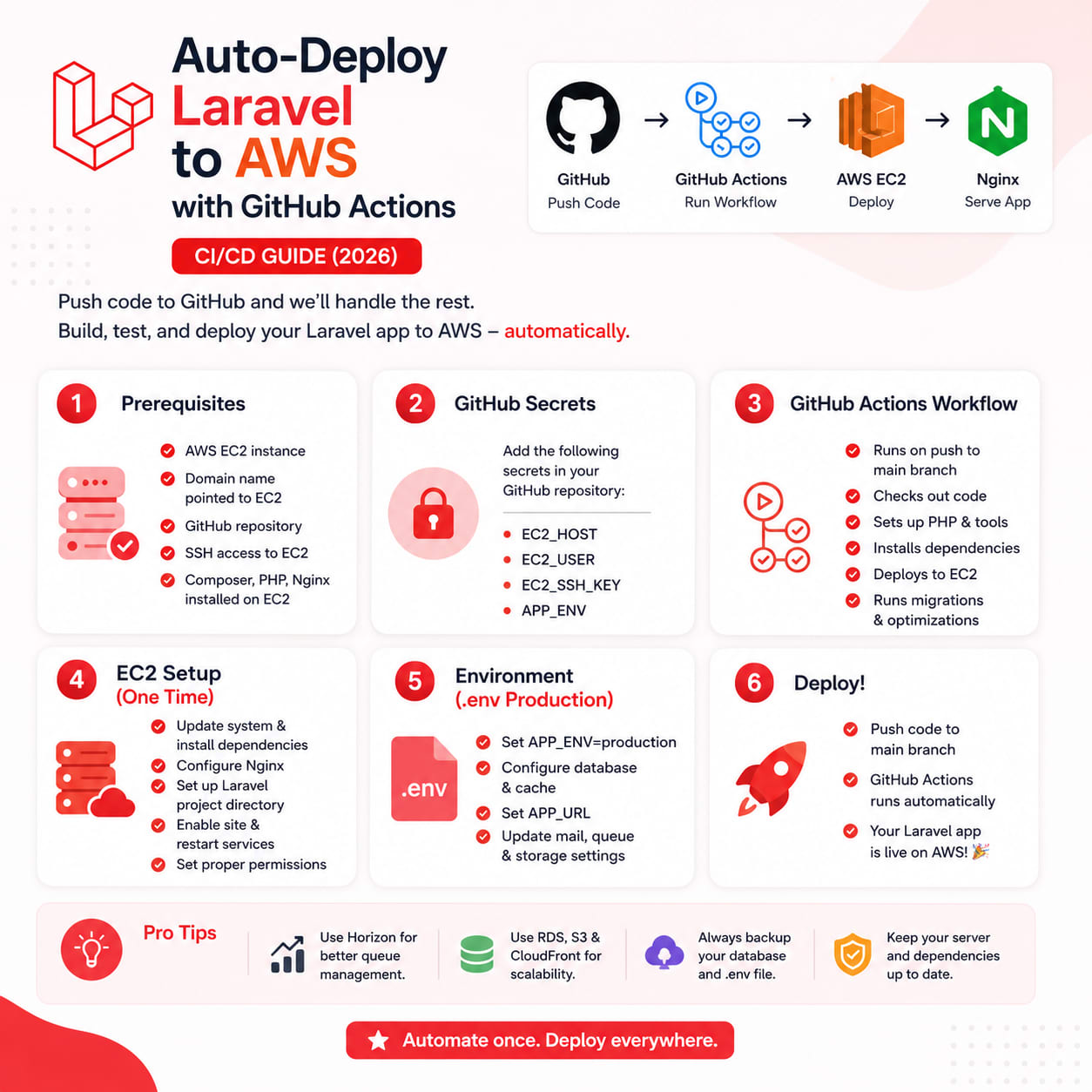
Auto-Deploy Laravel to AWS with GitHub Actions: A Zero-Downtime CI/CD Pipeline
If you're still deploying with git pull over SSH and crossing your fingers, this one's for you. Here's how to build a complete GitHub Actions pipeline that tests, builds, and deploys your Laravel app to an AWS EC2 instance automatically — with zero downtime, instant rollback, and no third-party deployment SaaS in the loop.
Table of Contents
- Why Manual Deployments Are Killing Your Velocity
- What We're Building
- Prerequisites
- Step 1: Server-Side Setup
- Step 2: Repository Secrets
- Step 3: The Complete Workflow File
- Step 4: Understanding the Symlink Swap
- Step 5: Instant Rollback
- Leveling Up: Staging Environments and OIDC Auth
- Handling Migrations Safely
- Adding Deploy Notifications
- Common Pitfalls to Avoid
- FAQ
- Wrapping Up
Why Manual Deployments Are Killing Your Velocity
Every manual deploy is a chance to forget a migration, skip a cache clear, or push untested code straight to production. It works fine when it's just you and a side project. It stops working the moment you have a team, a client with an SLA, or a codebase big enough that "I'll just remember to run artisan optimize" becomes a lie you tell yourself.
Automating this with GitHub Actions means every push to main goes through the exact same tested, repeatable path — no exceptions, no "it worked on my machine," no 2 AM "why is the site down" moments. And once it's set up, it costs you nothing per deploy. You push, you get a coffee, it's live.
What We're Building
The pipeline runs two jobs on every push to main:
Job 1 — Test:
- Spins up a fresh MySQL container
- Installs Composer dependencies
- Runs migrations against the test database
- Runs the full PHPUnit/Pest suite
Job 2 — Deploy (only runs if tests pass):
- Installs production dependencies (
--no-dev, optimized autoloader) - Builds frontend assets with Vite/npm
- Rsyncs the build into a timestamped release folder on EC2
- Links shared
.envandstorage/ - Runs migrations
- Rebuilds Laravel's config/route/view caches
- Atomically swaps a
currentsymlink to the new release - Reloads PHP-FPM
- Prunes old releases, keeping the last 5 for rollback
This is the same release-folder pattern tools like Envoyer and Deployer use under the hood — you're just building it yourself, for free, with full control over every step.
Prerequisites
- An EC2 instance with PHP 8.3, Composer, Node.js, and Nginx already configured
- A dedicated deploy user with SSH key access (never use root for this)
- Your app's
.envfile already sitting on the server (never commit it to the repo) - A security group that allows SSH (port 22) from GitHub's runner IP ranges, or better, from a bastion/VPN
Step 1: Server-Side Setup
Before touching GitHub Actions, get the folder structure right on EC2. This is the foundation the whole pipeline depends on:
bash
/var/www/myapp/
├── releases/
│   ├── 20260709120000/
│   ├── 20260710093000/
│   └── 20260711143200/
├── shared/
│   ├── .env
│   └── storage/
└── current -> releases/20260711143200/
Create it once, manually:
bash
sudo mkdir -p /var/www/myapp/{releases,shared/storage}
sudo chown -R deployer:www-data /var/www/myapp
Point your Nginx root at /var/www/myapp/current/public — not at a fixed release folder. This one config detail is what makes zero-downtime deploys possible later.
nginx
server {
    listen 80;
    server_name myapp.com;
    root /var/www/myapp/current/public;

    index index.php;

    location / {
        try_files $uri $uri/ /index.php?$query_string;
    }

    location ~ \.php$ {
        fastcgi_pass unix:/var/run/php/php8.3-fpm.sock;
        fastcgi_param SCRIPT_FILENAME $realpath_root$fastcgi_script_name;
        include fastcgi_params;
    }
}
Step 2: Add Repository Secrets
Go to Settings → Secrets and variables → Actions and add:
SecretValueEC2_HOSTYour instance's public IP or domainEC2_USERDeploy user (e.g. deployer)EC2_SSH_KEYPrivate key contents (PEM format)EC2_APP_PATHe.g. /var/www/myappSLACK_WEBHOOK_URL(optional) for deploy notifications
Generate a dedicated deploy key rather than reusing your personal SSH key:
bash
ssh-keygen -t ed25519 -f deploy_key -C "github-actions-deploy" -N ""
# Add deploy_key.pub to ~/.ssh/authorized_keys on the server
# Paste the contents of deploy_key (private) into the EC2_SSH_KEY secret
Step 3: The Complete Workflow File
Create .github/workflows/deploy.yml:
yaml
name: Deploy to AWS

on:
  push:
    branches: [main]

jobs:
  test:
    runs-on: ubuntu-latest
    services:
      mysql:
        image: mysql:8.0
        env:
          MYSQL_ROOT_PASSWORD: root
          MYSQL_DATABASE: testing
        ports:
          - 3306:3306
        options: >-
          --health-cmd="mysqladmin ping"
          --health-interval=10s
          --health-timeout=5s
          --health-retries=5

    steps:
      - uses: actions/checkout@v4

      - name: Setup PHP
        uses: shivammathur/setup-php@v2
        with:
          php-version: '8.3'
          extensions: mbstring, pdo_mysql, bcmath
          coverage: none

      - name: Cache Composer packages
        uses: actions/cache@v4
        with:
          path: vendor
          key: composer-${{ hashFiles('composer.lock') }}

      - name: Install Composer dependencies
        run: composer install --prefer-dist --no-progress

      - name: Copy .env for testing
        run: cp .env.testing .env

      - name: Generate key
        run: php artisan key:generate

      - name: Run migrations
        run: php artisan migrate --force

      - name: Run tests
        run: php artisan test

  deploy:
    needs: test
    runs-on: ubuntu-latest
    if: github.ref == 'refs/heads/main'

    steps:
      - uses: actions/checkout@v4

      - name: Setup PHP
        uses: shivammathur/setup-php@v2
        with:
          php-version: '8.3'

      - name: Install dependencies (production)
        run: composer install --optimize-autoloader --no-dev

      - name: Setup Node
        uses: actions/setup-node@v4
        with:
          node-version: '20'

      - name: Build frontend assets
        run: |
          npm ci
          npm run build

      - name: Set release timestamp
        run: echo "RELEASE=$(date +%Y%m%d%H%M%S)" >> $GITHUB_ENV

      - name: Setup SSH
        uses: webfactory/[email protected]
        with:
          ssh-private-key: ${{ secrets.EC2_SSH_KEY }}

      - name: Create release folder
        run: |
          ssh -o StrictHostKeyChecking=no ${{ secrets.EC2_USER }}@${{ secrets.EC2_HOST }} \
            "mkdir -p ${{ secrets.EC2_APP_PATH }}/releases/${{ env.RELEASE }}"

      - name: Sync build to release folder
        run: |
          rsync -az --exclude='.git' --exclude='node_modules' --exclude='tests' ./ \
            ${{ secrets.EC2_USER }}@${{ secrets.EC2_HOST }}:${{ secrets.EC2_APP_PATH }}/releases/${{ env.RELEASE }}

      - name: Link shared files, migrate, and cut over
        run: |
          ssh -o StrictHostKeyChecking=no ${{ secrets.EC2_USER }}@${{ secrets.EC2_HOST }} '
            set -e
            RELEASE_PATH=${{ secrets.EC2_APP_PATH }}/releases/${{ env.RELEASE }}
            cd $RELEASE_PATH

            ln -nfs ${{ secrets.EC2_APP_PATH }}/shared/.env .env
            ln -nfs ${{ secrets.EC2_APP_PATH }}/shared/storage storage

            php artisan migrate --force
            php artisan config:cache
            php artisan route:cache
            php artisan view:cache

            ln -nfs $RELEASE_PATH ${{ secrets.EC2_APP_PATH }}/current
            sudo systemctl reload php8.3-fpm

            cd ${{ secrets.EC2_APP_PATH }}/releases
            ls -1t | tail -n +6 | xargs -r rm -rf
          '

      - name: Notify Slack
        if: always()
        uses: 8398a7/action-slack@v3
        with:
          status: ${{ job.status }}
          fields: repo,message,commit,author
        env:
          SLACK_WEBHOOK_URL: ${{ secrets.SLACK_WEBHOOK_URL }}
Step 4: Understanding the Symlink Swap
The current symlink is the trick that gets you zero downtime, and it's worth understanding exactly why it works.
Nginx's root directive resolves the path on every request, following symlinks as it goes. Because current is a symlink and not a real directory, repointing it with ln -nfs is a single atomic filesystem operation — it either fully succeeds or doesn't happen at all. There's no window where half the old release and half the new release are being served simultaneously, which is exactly the failure mode you get with in-place git pull deploys.
Every deploy builds a completely fresh, isolated release folder. Nothing about the live site is touched until that very last ln -nfs line runs. If the rsync fails, if a migration errors out, if the build breaks — your production site keeps serving the last known-good release, untouched.
Step 5: Instant Rollback
Because old releases are kept (the script above retains the last 5), rolling back doesn't require a redeploy or waiting on CI. SSH in and repoint the symlink:
bash
ln -nfs /var/www/myapp/releases/20260710093000 /var/www/myapp/current
sudo systemctl reload php8.3-fpm
That's it. You're back to a known-good state in the time it takes to run two commands. Worth scripting this into a small rollback.sh on the server so it's a one-liner in an emergency.
Leveling Up: Staging Environments and OIDC Auth
Once the single-environment pipeline is solid, two upgrades are worth making:
Staging environment via matrix/environment config — duplicate the deploy job with a staging branch trigger and separate STAGING_EC2_HOST/STAGING_EC2_APP_PATH secrets, using GitHub Environments to require manual approval before production deploys.
Ditch long-lived SSH keys for AWS OIDC — if you're deploying to services like ECS, Elastic Beanstalk, or S3/CloudFront instead of raw EC2, GitHub Actions supports OpenID Connect federation with AWS IAM. Instead of storing a static access key as a secret, GitHub requests short-lived credentials scoped to a specific IAM role for the duration of the job. This removes an entire class of risk — there's no long-lived AWS credential sitting in your repo secrets at all.
yaml
- name: Configure AWS credentials via OIDC
  uses: aws-actions/configure-aws-credentials@v4
  with:
    role-to-assume: arn:aws:iam::123456789012:role/github-actions-deploy
    aws-region: ap-south-1
For pure EC2 + SSH setups like the one in this guide, a well-scoped deploy-only SSH key is still the pragmatic choice — just make sure it can't do anything beyond writing to the release folder and running the deploy script.
Handling Migrations Safely
Migrations are the riskiest part of any automated deploy because they're not easily reversible in production. A few habits that save you from a bad night:
- Always write a working
down()method, even if you think you'll never need it - For anything destructive (dropping a column, renaming a table), split it into two deploys — first add the new structure and dual-write, then remove the old structure in a later deploy once you've confirmed nothing depends on it
- Take an automated RDS/EC2 database snapshot before migrations run on production, either via a scheduled AWS Backup plan or a step in the workflow that calls the AWS CLI
- Never run
migrate:freshormigrate:refreshanywhere near a production deploy script —migrate --forceonly
Adding Deploy Notifications
The Slack step included in the workflow above posts a pass/fail status with the commit and author to a channel of your choice, using a webhook URL stored as a secret. This matters more than it sounds like — the first time a deploy silently fails at 11 PM because a migration conflicted, you'll be glad the whole team saw it in Slack instead of finding out from a user complaint the next morning.
Common Pitfalls to Avoid
- Committing
.envto the repo — always keep it inshared/on the server and symlink it in per release - Forgetting
--forceon migrations — Laravel blocks migrations in production without it, by design, and it's easy to lose an hour wondering why nothing happened - Not excluding
storage/from rsync — this can wipe user uploads and logs on every deploy if the shared symlink isn't set up correctly first - Skipping the test job to save time — the 60–90 seconds it costs is far cheaper than a broken production deploy
- Using root or a shared personal SSH key — always use a dedicated, narrowly-scoped deploy user and key
- No rollback plan — if you can't answer "how do I undo this deploy in under a minute," the pipeline isn't finished yet
FAQ
Does this work with Laravel Forge or Vapor already set up? You don't need this if you're already on Forge, Vapor, or Envoyer — they solve the same problem as a managed service. This pipeline is for teams that want the same guarantees without a monthly subscription, or that need more control over the exact deploy steps.
What about zero-downtime with queue workers? Add php artisan queue:restart as a step after the cutover — Laravel's queue workers pick up new code on their next job after a restart signal, without dropping in-flight jobs.
Can this deploy to multiple EC2 instances behind a load balancer? Yes — loop the rsync/SSH steps over a list of hosts stored as a secret, or use an AWS Systems Manager Run Command / CodeDeploy target group instead of raw SSH once you're past 2–3 servers.
Wrapping Up
This pipeline is intentionally dependency-light — no third-party deployment SaaS, no Kubernetes, just GitHub Actions, SSH, and a battle-tested release pattern. It scales comfortably for most Laravel apps running on a single EC2 instance or a small fleet behind a load balancer, and every piece of it is something you fully own and can debug at 2 AM without waiting on a vendor's support ticket.
Got a deployment setup you're trying to automate, or hit a wall with something similar? Drop a comment or reach out — always happy to talk shop.