
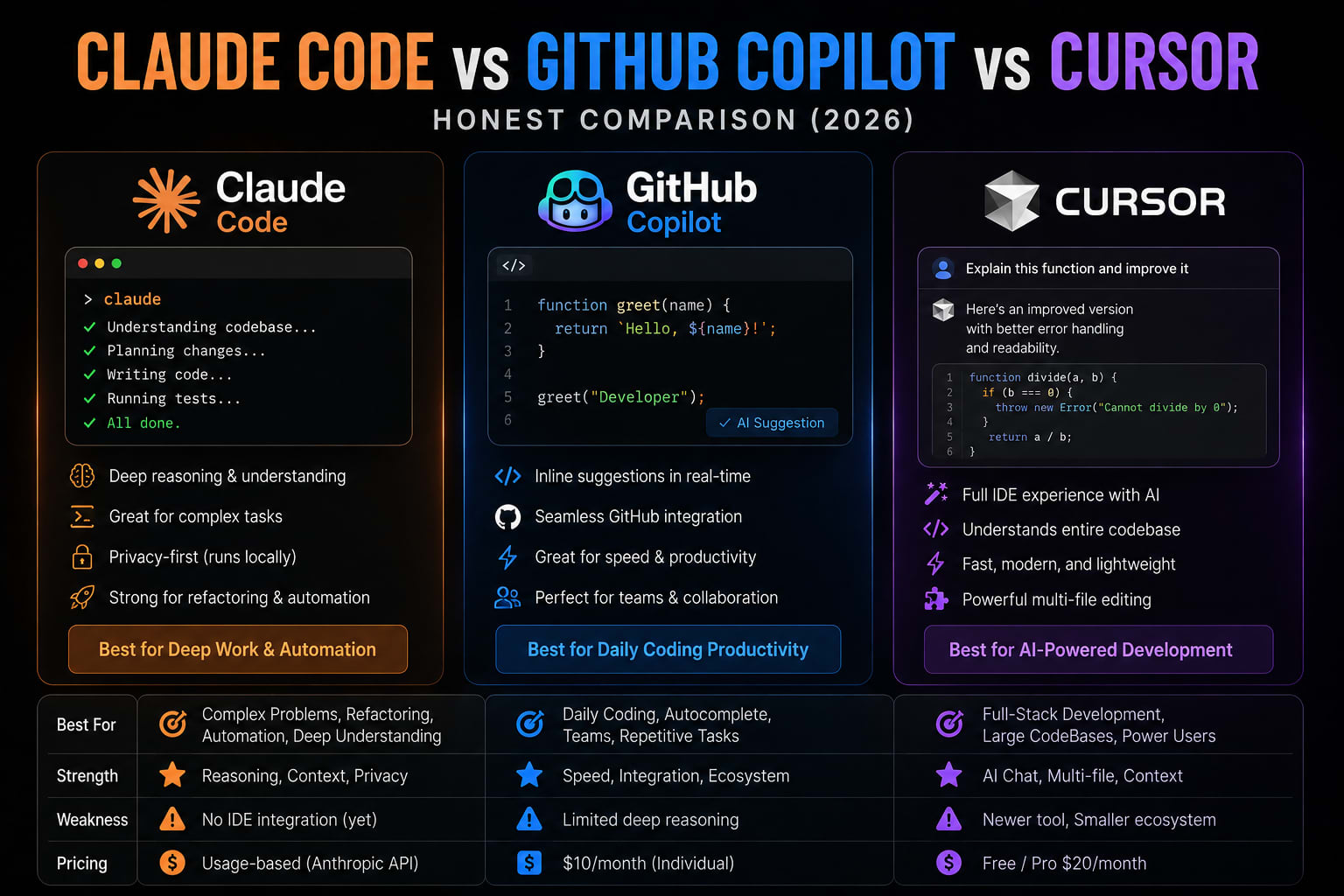
Claude Code vs GitHub Copilot vs Cursor — Honest Comparison (2026)
Let me save you the three weeks I spent figuring this out.
Every comparison article I found when I was evaluating these tools had the same problem. Either it was written by someone who used each tool for two days on a toy project, or it was thinly veiled vendor content, or it was benchmarks that had nothing to do with how I actually build things.
So I used all three on real work. Real features. Real bugs. Real legacy code. Here is the honest breakdown — including the parts that most reviews skip.
The Thing Every Comparison Gets Wrong
These are not three versions of the same product competing on features. They represent three distinct design philosophies competing for developer mindshare: the IDE-native approach, the plugin/extension approach, and the terminal-native agentic approach. None of these philosophies is universally superior. Each one implies a different relationship between the developer and the AI, and the right choice depends heavily on your workflow, your codebase, your team structure, and how comfortable you are delegating genuine decision-making to an AI system. KrishaWeb
Picking the wrong one is not a capability problem. It is a workflow mismatch.
The Market in 2026 — Where Things Actually Stand
Before the feature breakdown, the adoption data is worth understanding.
GitHub Copilot leads at 29% workplace adoption with 26 million or more total users, while Cursor and Claude Code are tied at 18% each in workplace usage. Medium
Claude Code launched in May 2025 and by early 2026 had a 46% "most loved" rating among developers, compared to Cursor at 19% and GitHub Copilot at 9%. That is a stunning reversal in under a year. WPWeb Infotech
Claude Code is the fastest-growing developer product in history — zero to 2.5 billion dollar run-rate revenue in nine months. Cursor is the fastest-growing SaaS company ever recorded — from 1 million to 2 billion ARR in approximately 28 months, outpacing Wiz, Deel, and Ramp. Medium
Copilot has the largest installed base. Claude Code has the highest satisfaction. Cursor has the best growth trajectory. All three are legitimate tools. None is winning cleanly.
Tool 1: GitHub Copilot — The Pragmatic Default
What It Actually Is
GitHub Copilot is Microsoft's AI coding assistant that integrates with virtually every major IDE as an extension, making it the most broadly accessible option in this comparison. Launched in 2021, it was the tool that proved AI coding assistance could be genuinely useful at scale. Appeaktech
Its 2026 capabilities include Copilot Chat with agent mode, a multi-model selector, and deep GitHub integration for issues, pull requests, and CI/CD. Workspace indexing provides codebase-level context within the GitHub ecosystem. Appeaktech
Pricing
- Free — limited completions, 50 chat messages/month
- Pro — $10/month, unlimited completions, 300 premium requests/month
- Pro+ — $39/month, 1,500 premium requests/month
- Business — $19/seat/month
- Enterprise — $39/seat/month, custom knowledge bases, admin controls
What It Does Well
Works in your existing editor. VS Code, JetBrains, Neovim, Vim — Copilot works wherever you already are. No migration. No new tool to learn. For teams with a standardized editor, this matters a lot.
GitHub integration is genuinely good. Issue-to-PR automation through Copilot Workspace is impressive for GitHub-centric workflows. If your entire development cycle lives in GitHub — issues, PRs, CI/CD, code review — Copilot's integration touches all of it.
Enterprise compliance is the most mature. For enterprise and compliance needs, Copilot has the most mature SSO, audit log, and organizational policy controls. Cursor and Claude Code offer team tiers, but with less enterprise maturity as of early 2026. Appeaktech
Lowest price by a significant margin. $10/month versus $20/month for the others. For a team of 50, that delta compounds fast.
What It Does Poorly
The honest assessment is that GitHub Copilot's core autocomplete experience, while still solid, is no longer best in class. Both Cursor and Claude Code offer richer context understanding and more capable code generation for complex tasks. Where Copilot's inline suggestions once felt like magic, they now feel like table stakes. KrishaWeb
The agentic capabilities Copilot has added are real improvements, but they lag behind what Claude Code delivers in terms of genuine autonomy. Copilot Workspace is impressive for GitHub-centric workflows, but Claude Code can operate across your entire local development environment in ways Copilot currently cannot match. For individual developers choosing a tool based purely on technical capability, Copilot is rarely the top choice in 2026. KrishaWeb
Best For
- Teams standardized on GitHub with enterprise compliance requirements
- Developers who cannot switch editors
- Budget-constrained teams or individuals
- Organizations with existing Microsoft/GitHub relationships
Tool 2: Cursor — The IDE Experience Winner
What It Actually Is
Cursor is a standalone AI IDE — a VS Code fork with AI integrated into every workflow. It is not an extension you bolt on. It is a complete editor redesigned around AI-assisted development. Growithraju
Pricing
- Free — limited AI features, 2,000 completions
- Pro — $20/month, unlimited completions, 500 fast premium requests
- Pro+ — $60/month, higher limits, priority access
- Ultra — $200/month, maximum limits
- Business — $40/seat/month
What It Does Well
The daily editing experience is the best of the three. Cursor leads on developer experience: Supermaven autocomplete with 72% acceptance rate, Composer for visual multi-file editing, and background agents for autonomous tasks. Growithraju
Visual diffs make review actually usable. When Cursor makes changes across multiple files, you see exactly what changed and why, in the editor, before accepting anything. This is the feature that most Claude Code users miss when they switch.
Model flexibility. Cursor lets you pick your model — Claude, GPT, Gemini — though the integration quality varies. The best experience is with Claude models, which adds some irony given that Claude Code is the competing product. WPWeb Infotech
Greenfield development. New projects, fresh codebases, and well-structured modern code are where Cursor shines most consistently.
What It Does Poorly
Cursor's AI features require sending code to an external API, which created friction with our security team for the services with the most sensitive business logic. There is a privacy mode, but it disables some of the most useful features. For teams with strict data handling requirements, this is a real constraint that the demos do not surface. Impact Techlab
Suggestion quality on TypeScript generics and complex type manipulation was often syntactically correct but semantically wrong in ways that compiled but produced subtle type unsafety. Impact Techlab
Vendor lock-in is real. Cursor is a VS Code fork, not VS Code. Your settings, extensions, and muscle memory carry over, but you are now dependent on Cursor's release cadence, their API pricing decisions, and their continued existence as a company.
Cursor's agentic capabilities, while improving rapidly, are generally less autonomous than Claude Code. Cursor is better thought of as a highly capable AI-assisted editor than a truly agentic system. It will help you write code faster, but it still expects you to be in the driver's seat directing each change. KrishaWeb
Best For
- Developers who want the best IDE experience without leaving a visual editor
- Greenfield projects and active feature development
- Teams where visual diff review is part of the workflow
- Developers comfortable with Claude models but wanting a GUI
Tool 3: Claude Code — The Agentic Power Tool
What It Actually Is
Claude Code is a terminal-native agent. It does not just complete code inline — it understands your entire codebase, edits files autonomously, runs commands, and creates pull requests. Growithraju
Claude Code leads on benchmarks: 80.8% on SWE-bench Verified with the largest context window at 1 million tokens. Best for complex multi-file coding and large codebase understanding. Growithraju
Pricing
- Pro — $20/month (included with Claude Pro)
- Max 5x — $100/month
- Max 20x — $200/month
- API — pay per token, variable cost
What It Does Well
Large codebase reasoning is genuinely superior. Claude Code runs in a terminal alongside a developer's normal workspace and connects to Claude's models with a 1M-token context window. That means it can hold most of a codebase in memory at once. SeoProfy
It asks before it acts. What struck me in the first hour was the conversational depth — you can describe what you are trying to accomplish at a high level and the tool asks clarifying questions before touching anything. That behaviour felt unusual coming from Copilot's autocomplete model, but I grew to appreciate it quickly. Impact Techlab
Complex refactoring across many files is where it separates from the field. A 600-line service class that mixes business logic, data access, and API formatting — the kind of refactor that is genuinely dangerous to do manually — Claude Code handles with a plan, a sequence, and verification at each step.
MCP integration connects it directly to your stack. PostgreSQL, Redis, GitHub, Slack, your internal APIs — Claude Code connects to your actual infrastructure and reasons about real data, not hypothetical examples.
Auto Mode, Dispatch, and Channels make it possible to delegate background tasks entirely. These features do not exist in Cursor or Copilot at the same level.
What It Does Poorly
Terminal only. No visual diffing. No inline editor suggestions. If you work primarily in a GUI and are not comfortable in a CLI environment, the learning curve is real.
Pricing for heavy users is variable. API token usage can be unpredictable on large codebases. Track your usage carefully in the first week.
43% of changes still need debugging. While Claude Code led in context understanding, 43% of AI-generated changes required debugging in production across all tools tested. Success depends on developer skill and tight TDD loops, not just adoption. SeoProfy
This is not unique to Claude Code — it is an industry-wide problem — but it is a reality check worth keeping in mind regardless of which tool you choose.
Best For
- Solo developers and freelancers who want maximum capability from one tool
- Complex refactors, architectural changes, and legacy code work
- Developers comfortable in the terminal
- Large codebases where context window size actually matters
For PHP and Laravel Developers Specifically
This comparison exists mostly in JavaScript/TypeScript circles. Here is the PHP-specific take.
Laravel + Claude Code is the strongest combination. Claude Code's MCP support connects directly to your PostgreSQL or MySQL database, your Redis instance, and your GitHub repository. For a Laravel monolith or API, the ability to reason about your entire codebase — migrations, models, controllers, services, tests — in a single context window is genuinely useful.
The CLAUDE.md setup for a Laravel project gives Claude persistent knowledge of your architecture decisions: repository pattern, form requests, API resources, event sourcing if you use it. That context compounds over weeks.
Laravel + Cursor works well for active feature development. Composer handles multi-file feature work cleanly. The visual diff experience is better for code review. The downside is that Laravel's PHP generics and complex type patterns can confuse Cursor's suggestions.
Laravel + Copilot is the path of least resistance if your team already uses GitHub and does not want to change editors. It works. It is not the best PHP experience of the three, but it is reliable and the GitHub integration for PR workflows is genuinely useful.
The Workflow Most Experienced Developers Use
The 2026 AI coding survey data shows experienced developers using 2.3 tools on average. These tools are not mutually exclusive and they each have a sweet spot. WPWeb Infotech
The most productive developers combine tools. The most common stack is Cursor for daily editing plus Claude Code for complex tasks, or Copilot in your IDE plus Claude Code in your terminal. Growithraju
The practical combination for a PHP/Laravel developer:
- Cursor or your existing editor + Copilot → daily editing, small changes, quick completions
- Claude Code → complex refactors, architectural decisions, large codebase analysis, security reviews, anything that spans more than five files
The $30–40/month total for this combination is real money, but it is significantly less than the time you save on one complex refactor.
The Decision Framework
Choose Claude Code if:
- You are a solo developer or freelancer who wants maximum capability from one tool
- Your work involves large codebases, complex refactors, or architectural changes
- You are comfortable in a terminal environment
- You want MCP integration with your actual stack
Choose Cursor if:
- You want the best IDE editing experience available
- Visual diffs and inline review are important to your workflow
- You are working primarily on greenfield projects
- You want model flexibility without committing to one provider
Choose GitHub Copilot if:
- Your team is standardized on GitHub with enterprise compliance requirements
- Budget is a real constraint
- You cannot or do not want to switch editors
- Your organization already has Microsoft or GitHub enterprise agreements
Use two of them if:
- You do both daily editing work and complex multi-file tasks regularly
- Budget allows $30–40/month for the combination
- You want to play to each tool's actual strengths
The Honest Caveat
This is the central paradox of 2026 AI coding tool adoption: developers are using these tools more aggressively than ever while trusting them less. The tools that win the next 24 months will be the ones that close this trust gap — not the ones that ship more autocomplete tokens per second. Medium
All three tools over-engineer. All three miss edge cases. All three ship code that compiles and is still wrong.
The right tool does not solve this. The right process does. Plan before implementation. Write tests before code. Review every AI-generated change as carefully as you would review a junior developer's PR. The tool is the assistant. You are still the engineer.
Tushar Modi — Full Stack Developer, Jaipur tusharmodi.in