
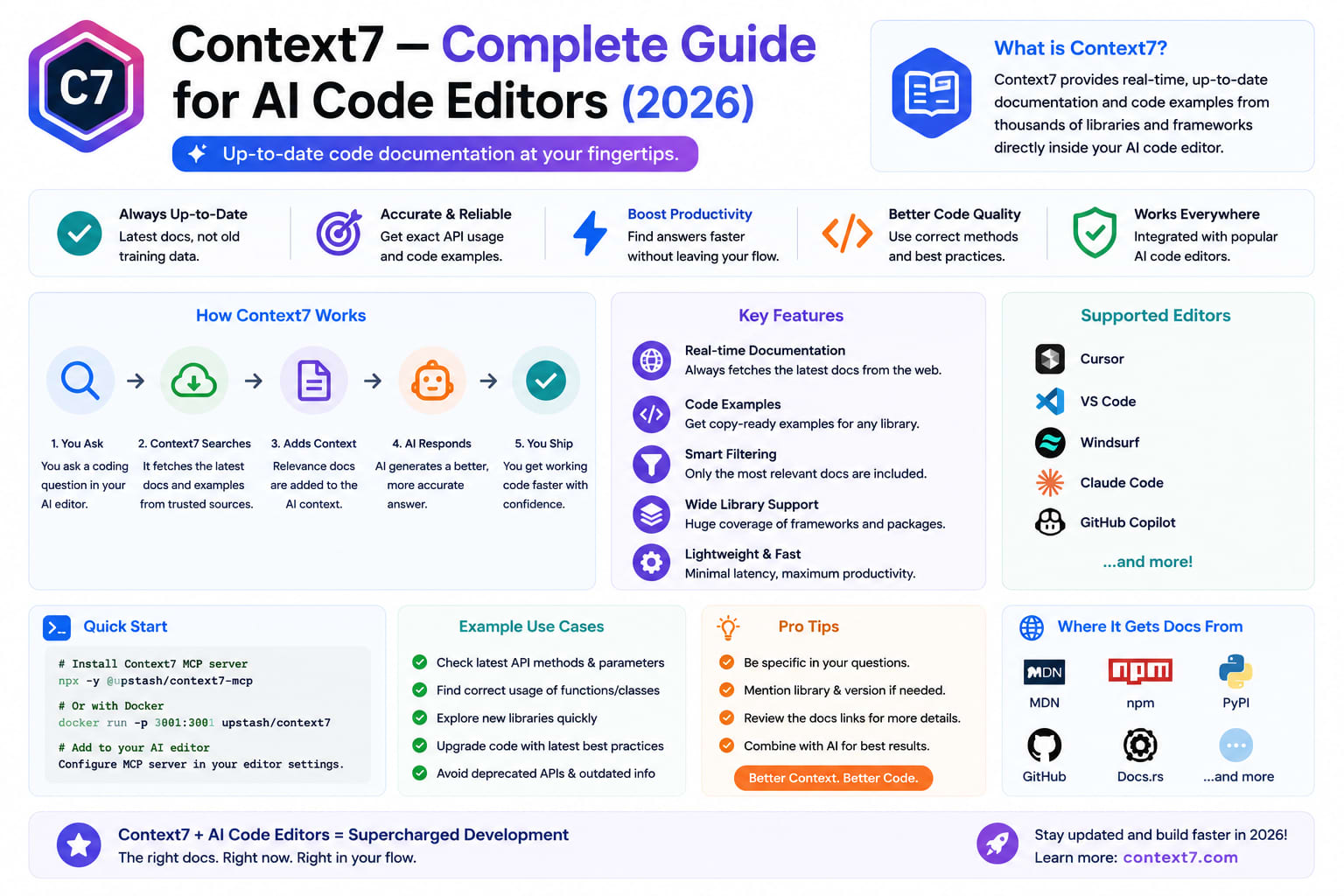
Context7 — Complete Guide for AI Code Editors (2026)
I lost 20 minutes to a bug that should not have existed.
Claude Code was helping me implement a file upload component in Livewire. The code it generated looked correct. The lifecycle hook name was familiar. The method signature made sense.
It was Livewire 2 syntax in a Livewire 3 component.
Not hallucinated completely — the method existed once. It just does not exist anymore. Claude's training data included the old docs. The current docs were never injected into the session. The agent wrote confident, plausible, wrong code.
This is not a reasoning failure. It is a context failure. And it is one of the most common failure modes in AI-assisted development in 2026.
AI coding assistants depend solely on what the model already knows. Many bugs happen because examples target the wrong library version. WP Pluginsify
Context7 is the fix. This guide covers what it does, how it works, how to set it up for Claude Code and Cursor, and the exact prompts that extract the most value for Laravel developers.
The Problem — AI Agents Work From Stale Documentation
Every language model has a knowledge cutoff. Claude Fable 5's training data ends in January 2026. The model cannot know about code released after that date — or more precisely, it may have partial, inconsistent knowledge about fast-moving libraries.
Here is what that means for a Laravel developer in July 2026:
LibraryShippedAgent knowledgeLaravel 13March 2026Partial — after cutoffLivewire 4January 2026Partial — at cutoffFilament v5February 2026Partial — after cutoffPostgreSQL 18September 2025GoodLaravel 13.15June 2026NonePest 3November 2025Partial
When your agent writes code for Laravel 13, it may be drawing on a mix of Laravel 12 and Laravel 13 knowledge — with no reliable way to know which version's patterns it is using.
AI coding assistants hallucinate APIs that don't exist because their training data is months or years out of date. ChatForest
The result is code that looks right, compiles, and behaves incorrectly in subtle ways that take time to diagnose.
What Context7 Is
Context7 is the most popular MCP server in 2026. It ranks #1 on MCP.Directory with nearly 2× the views of the #2 server, and ThoughtWorks placed it in their Technology Radar "Trial" ring. ChatForest
Context7 is an MCP server that feeds AI coding assistants up-to-date, version-specific library documentation. Context7 pulls current docs and code examples straight from the source into the model's context, which cuts the hallucinated APIs. AI Tool Directory
The mechanism is clean:
Without Context7:
Agent generates: $this->on('livewire:init', ...) // Livewire 2
Correct syntax:  #[On('livewire:initialized')]    // Livewire 3/4

With Context7:
"Implement file upload. use context7"
↓
Context7 fetches Livewire 4 current docs
↓
Agent sees: actual v4 API surface
↓
Agent generates: #[On('...')]  // correct
Installation — 2 Minutes
Option 1 — MCP Server (Recommended)
Context7 integrates with 30+ MCP clients including Cursor, Claude, VS Code, Windsurf, and OpenCode, via a remote endpoint or a local npm server. ChatForest
For Claude Code — add to .claude/mcp.json:
json
{
  "mcpServers": {
    "context7": {
      "command": "npx",
      "args": ["-y", "@upstash/context7-mcp@latest"]
    }
  }
}
For Cursor — add to .cursor/mcp.json:
json
{
  "mcpServers": {
    "context7": {
      "command": "npx",
      "args": ["-y", "@upstash/context7-mcp@latest"]
    }
  }
}
For Claude Desktop — add to claude_desktop_config.json:
json
{
  "mcpServers": {
    "context7": {
      "command": "npx",
      "args": ["-y", "@upstash/context7-mcp@latest"]
    }
  }
}
Restart your AI tool. Context7 is now active.
Option 2 — With API Key (Higher Rate Limits)
json
{
  "mcpServers": {
    "context7": {
      "command": "npx",
      "args": ["-y", "@upstash/context7-mcp@latest"],
      "env": {
        "CONTEXT7_API_KEY": "your-api-key-here"
      }
    }
  }
}
Get your API key at context7.com. Free tier is generous for individual use.
Option 3 — CLI (No MCP Required)
Besides the MCP server, Context7 offers a CLI and a Skills mode that work without MCP, for setups that cannot run a server. AI Tool Directory
bash
# Install CLI
npm install -g @upstash/context7

# Fetch docs for a specific library
ctx7 resolve laravel/laravel
ctx7 docs /laravel/laravel/13.x --tokens 8000

# Use in prompt directly
ctx7 prompt "How do I use PHP Attributes in Laravel 13 models?"
How Context7 Works Internally
Context7 exposes two MCP tools that your agent calls automatically:
Tool 1: resolve-library-id
Input:  "Laravel 13"
Output: /laravel/laravel/13.x

Input:  "Livewire 4"
Output: /livewire/livewire/4.x

Input:  "Pest"
Output: /pestphp/pest/3.x
Resolves human library names to Context7's internal versioned IDs. Handles aliases, common names, and version specifications.
Tool 2: get-library-docs
Input:  /laravel/laravel/13.x
        topic: "PHP Attributes models"
        tokens: 5000

Output: Current Laravel 13 documentation on PHP Attributes
        with code examples, from the actual v13 docs
Fetches current documentation filtered to the topic and capped at your specified token budget.
The flow in practice:
Your prompt: "Use PHP Attributes to refactor this model. use context7"

Agent automatically:
1. Calls resolve-library-id("Laravel 13") → /laravel/laravel/13.x
2. Calls get-library-docs(/laravel/laravel/13.x, "PHP Attributes", 5000)
3. Receives current v13 docs on PHP Attributes
4. Generates code using actual v13 syntax
5. Returns correct #[Fillable], #[Hidden], #[Cast] usage
No switching to the browser. No pasting docs. No stale examples.
Prompt Patterns — How to Use Context7 Effectively
The trigger is simple: add use context7 anywhere in your prompt. The agent calls the MCP tools automatically.
Basic Usage
# Without version — Context7 infers current version
"How do I implement debounceable jobs in Laravel? use context7"

# With explicit version
"Show me wire:navigate examples in Livewire 4. use context7"

# For multiple libraries
"Build a Livewire 4 component that uses Laravel 13 AI SDK. use context7"
Laravel-Specific Prompt Patterns
bash
# Form Request — get current validation rules syntax
"Create a StorePostRequest with these validation rules: [...].
Use Laravel 13 Form Request syntax. use context7"

# Livewire 4 — avoid Livewire 2/3 syntax
"Implement a live search component with cursor pagination.
Use Livewire 4 with Volt single-file syntax. use context7"

# Laravel AI SDK — get current production-stable API
"Build a text generation service using the Laravel 13 AI SDK.
Provider-agnostic, with caching. use context7"

# Pest 3 — current testing syntax
"Write Pest 3 tests for this Livewire component.
Cover rendering, user interaction, and event dispatch. use context7"

# Filament v5 — current resource API
"Create a Filament v5 Resource for the Order model
with filters, columns, and bulk actions. use context7"

# Inertia.js v2 — SSR and partial reloads
"Implement infinite scroll in an Inertia.js v2 React component.
Use partial reloads for performance. use context7"
CLAUDE.md Integration
Add to your CLAUDE.md to trigger Context7 automatically:
markdown
# Context7 Configuration

Context7 MCP is active on this project.

## When to use context7:
- Any code involving Laravel 13 (especially PHP Attributes, AI SDK, typed config)
- Any Livewire 4 code (wire:navigate, Volt, Islands, lazy loading)
- Any Pest 3 test writing
- Any Filament v5 resource or component
- Any package updated after January 2026

## Always append to prompts involving these:
"use context7"

## Libraries with confirmed Context7 coverage on this project:
- laravel/laravel (13.x)
- livewire/livewire (4.x)
- pestphp/pest (3.x)
- filament/filament (3.x)
- inertiajs/inertia (2.x)
- laravel/horizon (5.x)
Library Coverage — What's Indexed
Context7 indexes 33,000+ libraries. ChatForest
For Laravel stack developers, the most relevant:
PHP/Laravel ecosystem:
laravel/laravel— all major versions including 13.xlivewire/livewire— v2, v3, v4filament/filament— v2, v3, v5pestphp/pest— v2, v3laravel/horizon— currentlaravel/sanctum— currentlaravel/passport— currentspatie/*— major packagesinertiajs/inertia— v1, v2
JavaScript/Frontend:
react— all major versionsvue— v2, v3tailwindcss— v3, v4alpinejs/alpine— currentvite— currenttypescript— current
DevOps/Infrastructure:
docker— currentpostgresql— v16, v17, v18redis— currentnginx— current
Find a library:
bash
# Search available libraries
ctx7 search "livewire"
ctx7 search "filament"
ctx7 search "laravel horizon"

# Check specific library availability
ctx7 resolve "laravel/livewire"
Real Before/After Examples
Example 1 — Livewire Lifecycle
Without Context7:
php
// Generated by agent without Context7 — Livewire 2/3 syntax
class PostSearch extends Component
{
    public function boot()  // Livewire 2 pattern — wrong in v4
    {
        //
    }

    public function hydrate()  // Livewire 2 pattern
    {
        //
    }
}
With Context7 — use context7 appended:
php
// Generated with Context7 — correct Livewire 4 syntax
class PostSearch extends Component
{
    #[On('post-updated')]
    public function handlePostUpdated(int $postId): void
    {
        // v4 attribute syntax — correct
    }

    public function mount(): void
    {
        // correct v4 mount
    }
}
Example 2 — Laravel 13 Features
Without Context7:
php
// Agent uses Laravel 12 patterns
class Post extends Model
{
    protected $fillable = ['title', 'body'];  // old pattern
    protected $hidden   = ['internal_notes'];
    protected $casts    = ['published_at' => 'datetime'];
}
With Context7:
php
// Agent uses actual Laravel 13 PHP Attributes
#[Fillable(['title', 'body'])]
#[Hidden(['internal_notes'])]
#[Cast(['published_at' => 'datetime'])]
class Post extends Model {}
Example 3 — Pest 3 Test Syntax
Without Context7:
php
// Pest 2 syntax
it('creates a post', function () {
    $post = Post::factory()->create();

    expect($post)->toBeInstanceOf(Post::class);
});
With Context7:
php
// Pest 3 — with architectural testing and describe blocks
describe('Post creation', function () {
    test('stores post with valid data', function () {
        $user = User::factory()->create();

        $this->actingAs($user, 'sanctum')
            ->postJson('/api/v1/posts', [
                'title'  => 'Test Post',
                'body'   => 'Content here',
                'status' => 'published',
            ])
            ->assertCreated()
            ->assertJsonStructure(['data' => ['id', 'title']]);
    })->with([
        'draft status'     => [['status' => 'draft']],
        'published status' => [['status' => 'published']],
    ]);
});
Token Budget — How to Configure
Context7 injects documentation into your context window. That has a cost. Configure the token budget appropriately.
bash
# In your MCP config — set default token budget
{
  "mcpServers": {
    "context7": {
      "command": "npx",
      "args": ["-y", "@upstash/context7-mcp@latest"],
      "env": {
        "DEFAULT_MINIMUM_TOKENS": "5000",
        "CONTEXT7_API_KEY": "your-key"
      }
    }
  }
}
Recommended token budgets:
TaskToken BudgetWhySimple method lookup3,000Focused, specificComponent implementation5,000Needs examplesComplex feature8,000Full API surfaceArchitecture guidance10,000Comprehensive
Working with RTK: If you have RTK installed alongside Context7, they do not conflict. RTK compresses terminal command output. Context7 injects documentation. They solve different problems and compound well together.
Context7 vs Manual Documentation
Many developers currently handle this by pasting docs manually into prompts. Here is the honest comparison:
Manual pasteContext7SetupZero2 minutesPer-prompt effortHigh — find, copy, pasteZero — use context7Version accuracyDepends on which page you foundAutomaticToken efficiencyOften over-pastesTargeted retrievalMaintenanceManual every library updateAutomatic33,000+ librariesOne at a timeAll available
For libraries you use occasionally — manual paste is fine. For libraries you use daily — Context7 pays back its 2-minute setup immediately.
Limitations — Honest Assessment
The centralized registry model creates risks that the alternatives avoid. Neuledge
What Context7 does not solve:
- Private packages — Context7 indexes public repositories only. Internal packages, private Composer packages, or proprietary libraries are not covered. For private code, tools like Ref Tools or local MCP servers work better.
- Very recent changes — Context7 indexes current library documentation and code examples, then injects version-aware results. But indexing has a lag. A library updated yesterday may not be reflected today. Vibecodinghub
- Runtime behavior — Context7 injects documentation and code examples. It cannot tell the agent about runtime errors, server state, or application-specific behavior.
- Token consumption — Every Context7 call injects 3,000–10,000 tokens into context. With RTK handling terminal output and Context7 handling docs, monitor total context usage.
- Network dependency — Context7 requires an internet connection. Offline development environments need the local npm server mode.
Context7 vs Alternatives
Need the widest library coverage? Docfork covers 9,000+ libraries. Working with cutting-edge AI frameworks? Deepcon's semantic search makes it worth testing. Need codebase understanding, not just API docs? DeepWiki goes deeper. Most of these tools can coexist — MCP supports multiple servers simultaneously. Neuledge
For most Laravel developers: Context7 is the right choice. 33,000+ libraries, clean setup, battle-tested, and the Laravel/PHP ecosystem is well-covered.
Consider alternatives when:
- You need architectural code understanding (DeepWiki)
- Token budget is very tight (Ref Tools — 5K cap)
- You work offline frequently (local Context server)
- You need proprietary/private documentation (build your own MCP)
Complete Setup Checklist
bash
# 1. Install via MCP config
# Add to .claude/mcp.json or equivalent

# 2. Restart Claude Code / Cursor

# 3. Verify Context7 is active
# Ask agent: "List your available MCP tools"
# Should include: resolve-library-id, get-library-docs

# 4. Test with a simple prompt
"How do I use typed config in Laravel 13? use context7"

# 5. Update CLAUDE.md
# Add Context7 usage guidance for your specific stack

# 6. Optional — get API key for higher rate limits
# context7.com → dashboard → API keys
Wrapping Up
Most coding-agent failures are not raw reasoning failures. They are context failures, and stale documentation is one of the most common ones.
Context7 improves the tools developers already use instead of demanding a full workflow migration. You add use context7 to a prompt. The agent gets current docs. The code it generates matches the version you are actually running.
54,100 GitHub stars, 15.1 million visitors, #1 on MCP.Directory. There's a reason it's the #1 MCP server of 2026. ChatForest
Setup takes two minutes. The first time it saves you from a 20-minute debugging session that should have been a correct generation, it has paid back every second of that setup.
Tushar Modi — Full Stack Developer, Jaipur