
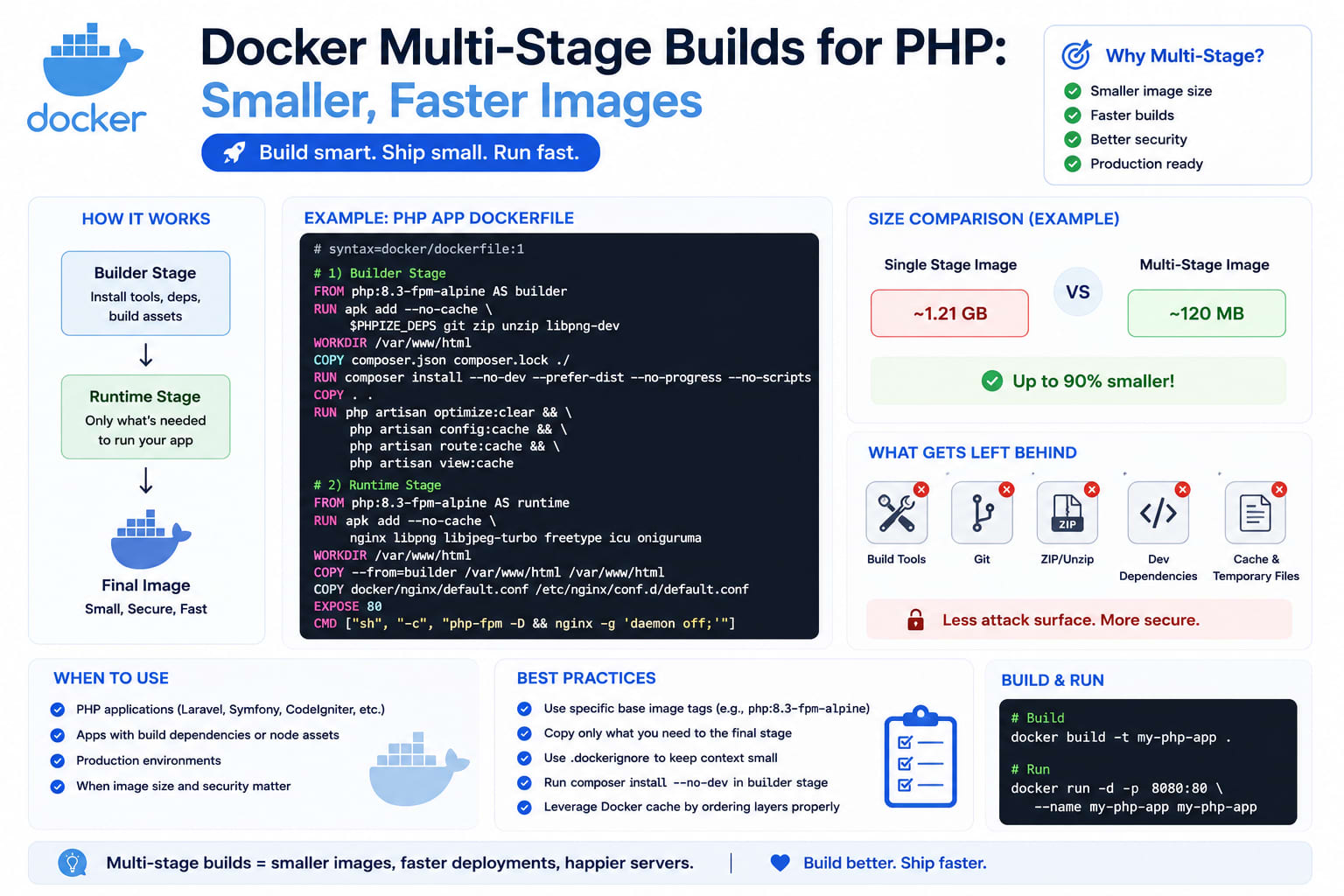
Docker Multi-Stage Builds for PHP: Smaller, Faster Images
A single-stage Dockerfile for a PHP app usually ships Composer, Node, npm packages, dev dependencies, and your entire build toolchain straight into the production image — none of which your app needs at runtime. Multi-stage builds fix this: build in one stage, copy only the finished output into a clean runtime stage, and throw everything else away.
Table of Contents
- The Problem With Single-Stage Dockerfiles
- How Multi-Stage Builds Actually Work
- A Complete Multi-Stage Dockerfile for Laravel
- Why the Image Size Difference Is So Large
- Optimizing Layer Caching for Faster Builds
- Choosing a Base Image: Alpine vs Debian-Slim
- Using
.dockerignoreCorrectly - Named Build Stages for Local Development
- Common Mistakes
- Wrapping Up
1. The Problem With Single-Stage Dockerfiles
A typical naive PHP Dockerfile looks like this:
dockerfile
FROM php:8.3-fpm

RUN apt-get update && apt-get install -y nodejs npm git unzip
COPY . .
RUN curl -sS https://getcomposer.org/installer | php -- --install-dir=/usr/local/bin --filename=composer
RUN composer install
RUN npm install && npm run build
This works, but the final image now permanently contains: Node.js, npm, every node_modules package, Composer itself, Git, and every dev dependency Composer installed. None of that is needed once assets are built and the autoloader is generated — it's dead weight shipped to every server, in every deploy, forever.
2. How Multi-Stage Builds Actually Work
A multi-stage Dockerfile uses multiple FROM statements, each starting a fresh, isolated stage. Later stages can selectively COPY --from=<stage> specific files from earlier stages — pulling out only the finished artifacts (compiled assets, vendor folder) while leaving every build tool behind in a stage that never ships anywhere.
dockerfile
FROM node:20 AS frontend-build
# ... build frontend assets here

FROM composer:2 AS composer-build
# ... install PHP dependencies here

FROM php:8.3-fpm AS runtime
# ... copy ONLY the finished output from the stages above
Docker builds every stage, but only the last stage (or whichever one you target) becomes the final image that gets tagged, pushed, and deployed. Everything in earlier stages simply doesn't exist in the output.
3. A Complete Multi-Stage Dockerfile for Laravel
dockerfile
# ---- Stage 1: Build frontend assets ----
FROM node:20-alpine AS frontend-build
WORKDIR /app
COPY package.json package-lock.json ./
RUN npm ci
COPY resources/ resources/
COPY vite.config.js ./
RUN npm run build

# ---- Stage 2: Install PHP dependencies ----
FROM composer:2 AS composer-build
WORKDIR /app
COPY composer.json composer.lock ./
RUN composer install --no-dev --no-scripts --no-autoloader --prefer-dist
COPY . .
RUN composer dump-autoload --optimize --no-dev

# ---- Stage 3: Final runtime image ----
FROM php:8.3-fpm-alpine AS runtime
WORKDIR /var/www

RUN apk add --no-cache libpng libzip freetype icu-libs \
    && docker-php-ext-install pdo_mysql mbstring exif pcntl bcmath gd

COPY --from=composer-build /app/vendor/ /var/www/vendor/
COPY --from=frontend-build /app/public/build/ /var/www/public/build/
COPY . /var/www

RUN chown -R www-data:www-data /var/www/storage /var/www/bootstrap/cache

USER www-data
EXPOSE 9000
CMD ["php-fpm"]
Notice the final stage never installs Node, npm, or Composer — it only ever receives the two things it actually needs to run: the vendor/ folder and the compiled public/build/ assets, copied in from stages that get discarded entirely once the build finishes.
4. Why the Image Size Difference Is So Large
A single-stage image that includes Node, npm, node_modules, Composer, and Git on top of a PHP base can easily land at 900MB–1.2GB. The equivalent multi-stage build, shipping only PHP-FPM, the compiled vendor/ folder, and built frontend assets on an Alpine base, typically lands between 150–250MB — often a 5–7x reduction.
That difference compounds across your whole pipeline: faster image pushes/pulls in CI, faster deploys, less storage cost in your container registry, and a meaningfully smaller attack surface since tools like Git and npm — potential vectors if a container is ever compromised — simply aren't present in the running image at all.
5. Optimizing Layer Caching for Faster Builds
Docker caches each layer and skips rebuilding it if nothing that layer depends on has changed. Order matters — copy files that change less often earlier:
dockerfile
# Good: composer.json/lock copied BEFORE the rest of the app
COPY composer.json composer.lock ./
RUN composer install --no-dev
COPY . .
If you copy the entire app first and then run composer install, Docker invalidates the Composer layer on every single code change, even ones that don't touch composer.json — forcing a full dependency reinstall on every build. Copying the lock files first means Composer's install layer stays cached until dependencies actually change, which is usually the vast majority of your commits.
The same principle applies to the frontend stage — copy package.json/package-lock.json before the rest of resources/, so npm ci stays cached unless dependencies change.
6. Choosing a Base Image: Alpine vs Debian-Slim
- Alpine (
php:8.3-fpm-alpine) — smallest option, usesmusllibc instead ofglibc. Great for size, but occasionally hits compatibility issues with certain PHP extensions or compiled dependencies that expectglibc. - Debian-slim (
php:8.3-fpm) — slightly larger, but broader compatibility with PHP extensions and fewer surprises if you're installing less common packages.
For most Laravel apps, Alpine works fine and is worth defaulting to. If you hit an obscure extension compilation error that traces back to musl vs glibc differences, that's the signal to switch that specific stage to Debian-slim rather than fighting the incompatibility.
7. Using .dockerignore Correctly
Without a .dockerignore, Docker sends your entire project directory — including .git, node_modules, and vendor from your local machine — to the build context on every single build, slowing things down and risking stale local dependencies leaking into a stage that expects a clean install:
.git
node_modules
vendor
.env
storage/logs/*
storage/framework/cache/*
tests
.github
*.md
This one file often has more impact on build speed than most other optimizations combined, simply because it stops gigabytes of irrelevant files from being sent to the Docker daemon in the first place.
8. Named Build Stages for Local Development
You can target an earlier stage directly for local development, where you actually want dev dependencies and hot-reloading:
bash
docker build --target frontend-build -t myapp-dev-assets .
Or maintain a separate development stage with composer install (no --no-dev flag) and Xdebug installed, while your production build targets the lean runtime stage — one Dockerfile, two very different outputs depending on which stage you build.
9. Common Mistakes
- Copying the whole app before installing dependencies — kills layer caching, turns every commit into a full dependency reinstall
- Installing dev dependencies in the runtime stage — Xdebug, Faker, and testing libraries have no business in a production image
- Forgetting
--no-devoncomposer install— silently ships your entire dev toolchain into production - Running as root in the final image — always drop to a non-root user (
www-dataor similar) for the actual running container - Skipping
.dockerignore— slow builds and occasional stale-file bugs that are confusing to debug - Not pinning base image versions —
php:8.3-fpm-alpinetoday isn't guaranteed to be identical six months from now; pin to a specific patch version for reproducible builds where it matters
10. Wrapping Up
Multi-stage builds aren't an advanced technique reserved for large teams — they're close to a default best practice at this point for any PHP or Laravel app going into a container. The Dockerfile ends up slightly longer, but the payoff is a production image that's smaller, faster to deploy, and doesn't carry your entire build toolchain into an environment where none of it should exist in the first place.