
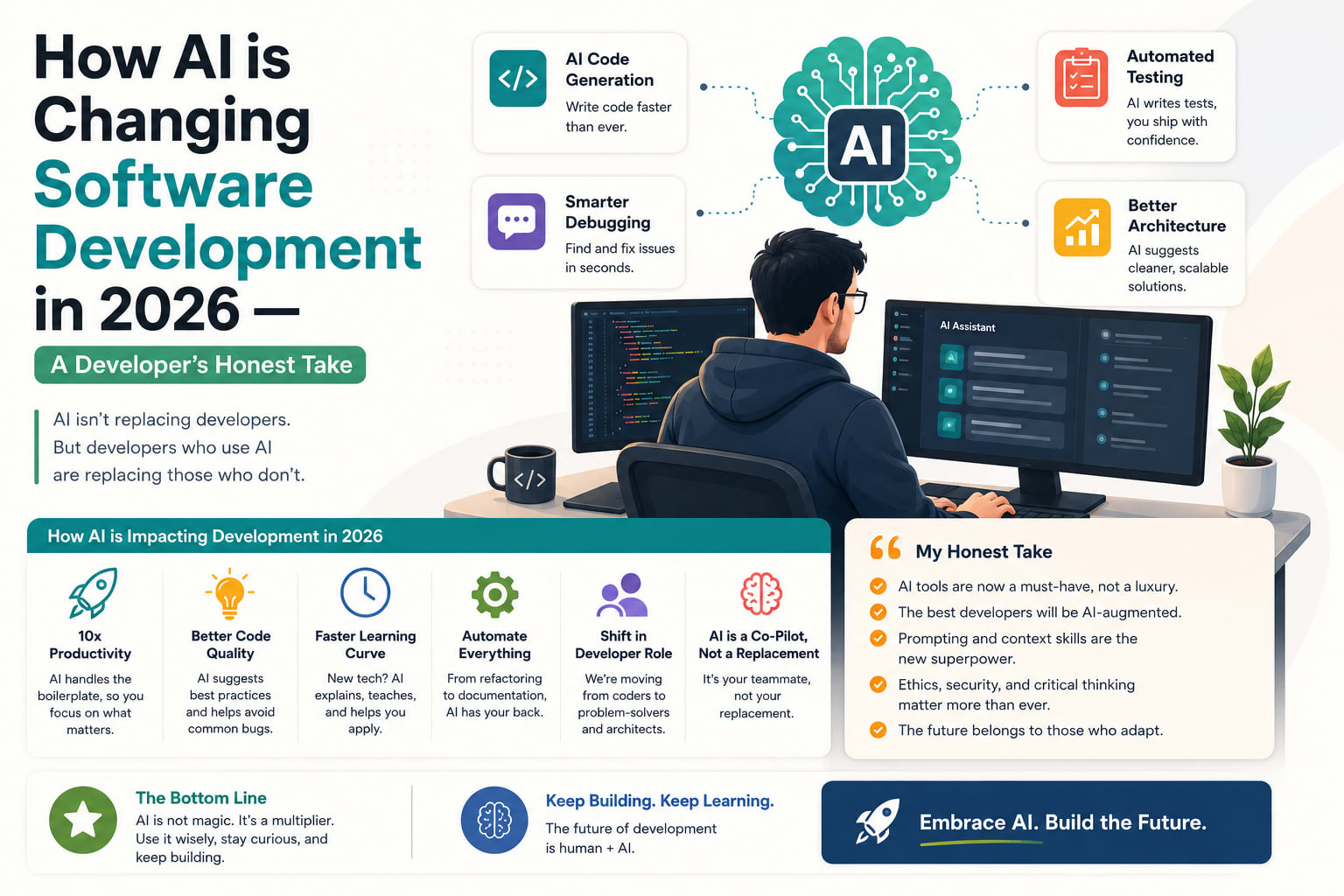
How AI is Changing Software Development in 2026 — A Developer's Honest Take
I want to start with two numbers that sit in tension with each other.
85% of developers regularly use AI tools for coding, debugging, and code review in 2026. Modall
Trust in AI output dropped to 29% in 2025 — 11 percentage points lower than in 2024. 46% of developers actively distrust the accuracy of AI tool output — a sharp jump from 31% the year before. LoopStudio
Usage is near-universal. Trust is collapsing. That combination tells you more about where software development actually stands in 2026 than any keynote or product launch has.
I have been building Laravel applications professionally for four years. I run a freelance practice, maintain several client projects, and spend a significant portion of every working day using Claude Code, Cursor, and the Laravel AI SDK. This is my honest account of what changed, what did not, and what the numbers actually mean for working developers.
The Numbers First — What the Data Actually Says
Before the personal take, the data deserves proper framing.
JetBrains' January 2026 survey found 90% of developers regularly use at least one AI tool at work for coding, with 74% having adopted a specialized AI coding tool — a dedicated coding assistant rather than a general-purpose LLM chat interface. DORA also found that 65% of respondents are heavily reliant on AI, and that developers spend a median two hours per day on AI-assisted work. Digital Applied Team
Two hours per day is not supplemental. That is structural workflow integration.
Developers report spending 11.4 hours per week reviewing AI-generated code versus 9.8 hours writing new code — a reversal of the 2024 pattern. Digital Applied Team
For the first time in history, reviewing outpaces writing. That is not a complaint — it is the job evolving. The developer's role is shifting from author to reviewer, from implementer to director.
Around 41% of all code written in 2025 is AI-generated. Current trajectories suggest crossing 50% by late 2026 in organizations with high AI adoption. Medium
And yet:
66% of developers cite "AI solutions that are almost right, but not quite" as their biggest frustration, and 45% say debugging AI-generated code is more time-consuming than writing it themselves. LoopStudio
This is the central paradox. AI tools are faster. AI tools are wrong in specific, hard-to-catch ways. The net win is real. The revolution is not 10x.
What Actually Changed — The Honest List
1. Boilerplate is Dead
This is the clearest, least controversial change. Writing a Form Request, an API Resource, a migration, a factory, a test stub — tasks that used to take 10-15 minutes each now take 30 seconds.
For a Laravel developer, the gains compound fast:
Before AI — typical feature setup:
Form Request           15 minutes
API Resource           10 minutes
Database migration     10 minutes
Model with casts       8 minutes
Factory                8 minutes
Basic feature test     12 minutes
Total: ~63 minutes before writing a single line of business logic

After AI — same setup:
Describe the feature, review the output, adjust
Total: ~8 minutes
That is 55 minutes per feature returned to actual thinking. Over a week with multiple features, this is hours — not percentages.
2. Code Review Quality Improved
AI tools are rated most effective for writing documentation at 74%, explaining or understanding existing code at 66%, greenfield prototyping at 62%, and generating tests at 59%. Software Orca
The pre-commit review workflow — running specialized subagents in parallel, each focused on security, performance, Laravel conventions, edge cases — catches issues that would have reached production before.
This is not AI replacing code review. It is AI making code review systematic where it was previously opportunistic. The human still makes the final call. The AI catches the patterns a tired developer misses at 4pm on a Friday.
3. Legacy Code is Less Scary
The 1 million token context window that Claude Code ships with changes what is possible with legacy codebases. A 2,000-line service class that mixes business logic, database access, and API formatting — previously you would spend a day just understanding it before you could touch it.
Now: drop it in context, ask for an explanation and a refactor plan, review the plan, execute. The work is still real. The ramp-up time is dramatically shorter.
4. The Speed of Iteration Increased
In Q1 2025, only 34% of Claude Code sessions involved multi-file edits. By Q1 2026, that number reached 78%. Agents are no longer limited to editing a single file. They're making coordinated changes across codebases, updating imports, modifying tests, and adjusting configurations in a single session. Modall
The ability to say "rename this concept throughout the codebase" and have it done correctly across 40 files in five minutes — that changes the cost-benefit calculation on refactoring. Work that used to be "too disruptive for the value" is now reasonable to tackle.
5. The Role Shifted From Writing to Directing
Engineers have to orchestrate and context switch more often. We're going from "how" to build to "what" to build. The Pragmatic Engineer
This is the shift that changes what a senior developer actually does. Less time at the keyboard writing implementation details. More time on system design, prompt engineering, reviewing agent output, making architectural decisions. The job title is the same. The content of the work is different.
What AI Did NOT Change — Also Honest
1. Architectural Judgment
No AI tool has told me something I did not already know about system design. Claude Code can implement a Repository pattern correctly once you have decided to use one. It cannot tell you whether a Repository pattern is the right choice for your specific use case, team size, and future plans.
The decisions that matter — how to structure the authentication system, when to introduce a message queue, whether to build a feature or integrate a third-party service — remain entirely human.
2. Complex Debugging
AI accelerates the easy 60% of the work and creates new overhead in the complex 40%. The net win is real, but it is not the 10x revolution sold in keynotes. LoopStudio
Race conditions. Subtle auth logic with timing dependencies. Cache invalidation edge cases. Intermittent failures that only appear under specific load patterns.
AI tools make these harder, not easier. You are now debugging AI-generated code on top of your own. The surface area of "things that could be wrong" expanded. The tools that help you debug it did not expand at the same rate.
3. Client Communication
Scoping a project. Setting expectations about what is technically feasible. Explaining why a feature will take longer than the client thinks. Saying no. None of this changed.
The ability to build faster does not change the human dynamics of client work. If anything, it raises expectations. Clients who hear you use AI assume everything is faster now. Managing that expectation is as important as ever.
4. Security and Code Ownership
The best teams treat AI tools like a junior developer that types extremely fast: helpful, but needs guardrails and senior review. Netcorpsoftwaredevelopment
This framing is exactly right. A junior developer who types 10x faster is still a junior developer. Their output needs the same review. The security audit needs to be more thorough, not less, because the volume of code increased.
I review every diff. Always. The rule did not change when I started using AI tools. The volume of diffs I review increased significantly.
The Trust Problem — Why It Matters
Usually, as a technology matures, people trust it more. With AI, the opposite is happening. LoopStudio
This is the most interesting data point in the field right now. Developers are using AI more. They trust it less. The reason is straightforward: experienced developers have now seen exactly where it breaks.
AI tools are confidently wrong in ways that are harder to catch than obviously wrong. A Laravel controller that validates input in the wrong place, compiles without errors, passes basic tests, and deploys fine — but violates architectural conventions and creates a maintenance problem six months later. An AI tool that generates this never flags it as an issue. It is technically correct. It is practically wrong.
The biggest day-to-day friction point says everything about where AI still fails: 66% of developers cite "AI solutions that are almost right, but not quite" as their biggest frustration. LoopStudio
"Almost right" is the hardest category. Obviously wrong is easy to catch. Almost right requires the same depth of review as evaluating correct code — except you are also looking for the subtle problem that makes it almost, not quite.
The Workflow That Actually Works — For a Laravel Developer
After 18 months of adjusting, here is what the productive workflow looks like:
What I delegate to AI:
- Boilerplate generation — migrations, factories, Form Requests, API Resources
- Test stub generation
- Documentation and docblocks
- Explaining legacy code
- First-pass refactoring proposals
- Pre-commit review (parallel subagents)
- Debugging obvious errors (stack traces, type errors)
What I keep:
- Architecture decisions
- Security-sensitive code (auth flows, payment handling)
- Final review and approval of all diffs
- Client communication and scoping
- Complex debugging
- Performance-critical sections that need careful thought
The rule that makes it work:
Review every AI output as carefully as you would review a junior developer's PR. Not because AI is bad. Because the cost of almost-right code in production is the same regardless of who wrote it.
The Tools in 2026 — Honest Ranking for Backend Developers
Claude Code (28%) and Cursor (24%) account for over half of primary-tool selections, but most developers run a three-tool stack rather than committing to one. Digital Applied Team
My honest stack for Laravel development:
Claude Code — primary for complex tasks. 1M context window for large codebases. MCP connects directly to PostgreSQL and Redis. CLAUDE.md teaches it my architecture conventions. Best for refactoring, architecture, and anything spanning multiple files.
Cursor — daily editing. Design Mode for frontend work. Bugbot for pre-push review. Side Chats for asking questions without interrupting the main agent. Best for moment-to-moment coding.
GitHub Copilot — inline suggestions where they help. Not a primary tool anymore. The gap between Copilot and Claude Code/Cursor widened significantly in 2026.
The most honest answer to "which tool?" is: use two. Play to each tool's strengths. The productivity floor of the combination is higher than any single tool at maximum usage.
What the Senior Developers Are Actually Doing
The overall consensus is that AI will amplify and multiply tendencies and patterns that existed before, and the impact of the tools varies accordingly among users. The Pragmatic Engineer
Developers who were already writing clean, well-structured code — with good test coverage, clear architecture, sensible abstractions — are getting dramatically more productive. The AI output in a well-maintained Laravel codebase with a good CLAUDE.md is consistently better than the same tools running on a codebase with no standards.
Developers who relied on copy-paste from Stack Overflow, who rarely wrote tests, who let controllers grow to 400 lines — they are producing more code faster. It is not always better code. The patterns that created technical debt before create it faster now.
The most successful engineers in 2026 are not those who avoid AI or rely on it completely, but those who know what to delegate and what to handle themselves. LoopStudio
This is the sentence I would put on every AI coding tutorial. It is the thing the adoption statistics do not capture.
The Question Everyone Is Asking — Will AI Replace Developers?
AI can help, but it is not building solid, secure software on its own. That is why having the right team still matters. Netcorpsoftwaredevelopment
Developers using AI tools are twice as likely to report feeling happier, more fulfilled, and regularly entering a flow state. But that happiness and fulfillment comes from doing different work — solving harder problems, designing better systems, focusing on what matters instead of typing boilerplate. Medium
The Bureau of Labor Statistics projects 15% employment growth for software developers through 2030. AI is not shrinking the field. It is changing what experienced developers spend their time on.
The developers at risk are not those who write the most code. They are those whose value was exclusively in writing code — not in understanding systems, not in making architectural decisions, not in communicating with clients, not in reviewing and approving output. Those skills compound. The ability to write a Form Request quickly does not.
My Honest Assessment After 18 Months
What changed: the amount of time I spend on work that did not require my judgment. That time is now largely gone. I spend more time on architecture, client communication, code review, and problem-solving. Less time on implementation detail.
What did not change: the judgment itself. The decisions that matter — what to build, how to structure it, whether it is right — are still mine.
The gap between developers who adapt and those who do not is growing. Not because AI is replacing anyone. Because the developers who adapt are shipping more, managing more projects, and delivering more value per hour. The ones who do not are competing on the same terms as before — in a market where their peers are operating at higher leverage.
That is the honest take. The tools are real. The productivity gains are real. The judgment requirement did not go away — it became more important.
Tushar Modi — Full Stack Developer, Jaipur