
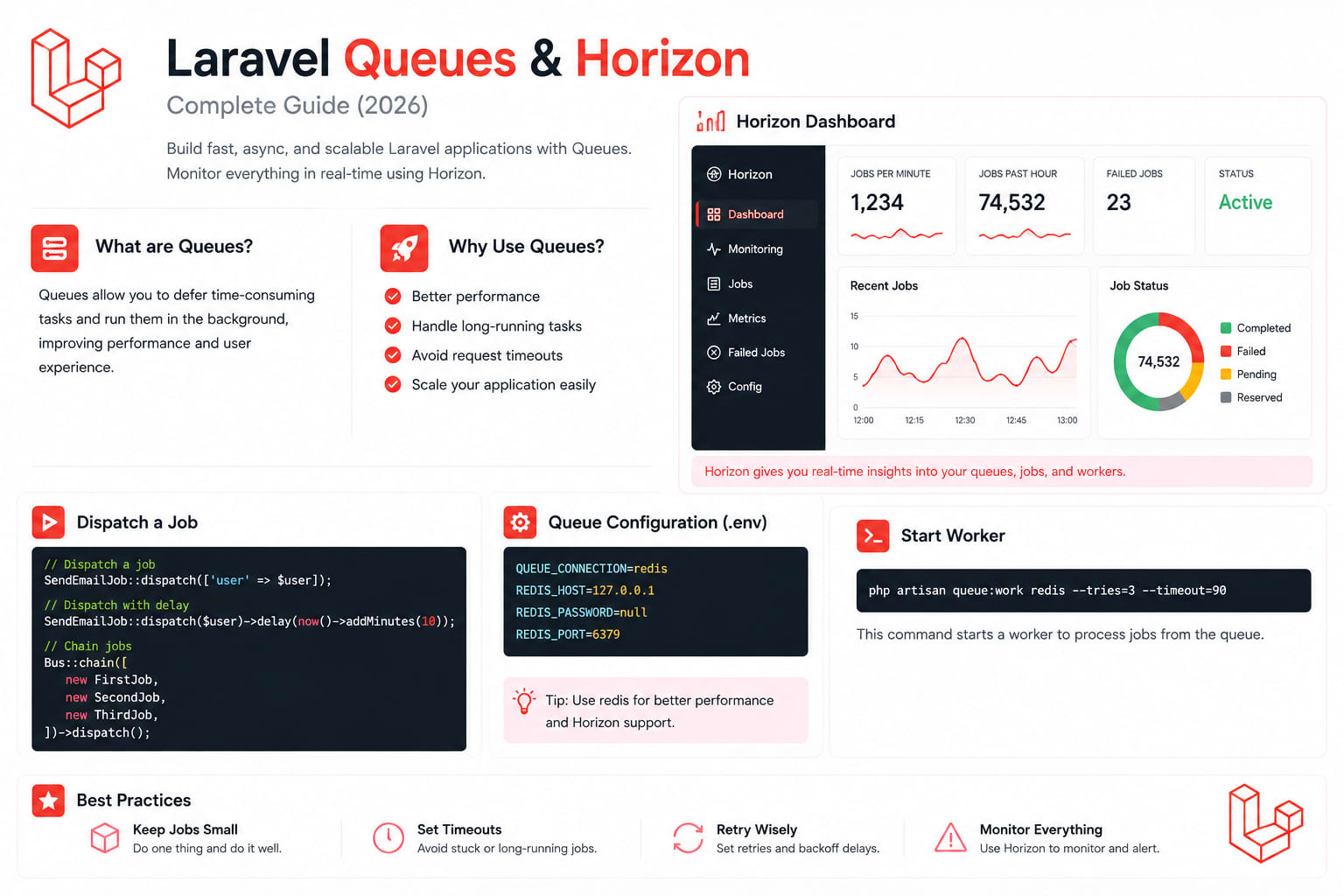
Laravel Queues & Horizon — Complete Guide (2026)
Every web request has a clock ticking against it.
Send a welcome email inside the request cycle and the user waits. Generate a PDF inside the request cycle and the user waits. Call a third-party API inside the request cycle and the user waits. Do any of these inside the request lifecycle and you are making the user sit through work that has nothing to do with their response.
Queues flip this completely. Instead of doing the heavy work immediately, you push a job onto a queue and return the response right away. A separate worker process picks it up and executes it completely outside the user's request.
I have built queue systems on SaaS platforms, e-commerce APIs, and GoRiderss. This guide covers everything — from your first job to production-grade Horizon configuration, Bus::bulk(), batching, chains, and failure handling.
The Mental Model
User Request
    ↓
Controller dispatches Job
    ↓
Redis stores the job payload
    ↓
Response returned immediately (milliseconds)
    ↓ (background)
Worker picks up job
    ↓
Job executes
    ↓
Done — user never waited
Three components:
- Job — the work to be done (a PHP class)
- Queue — the list of pending jobs (Redis, database, SQS)
- Worker — the background process that executes jobs
That is the entire system. Everything else is configuration and strategy.
Queue Driver — Choose Redis in Production
Laravel supports several queue drivers. The choice matters more than most tutorials admit.
php
// config/queue.php — driver options
'connections' => [
    'sync'     => ['driver' => 'sync'],      // dev only — runs immediately
    'database' => ['driver' => 'database'],  // dev/small — slow under load
    'redis'    => ['driver' => 'redis'],     // production — fast, Horizon-compatible
    'sqs'      => ['driver' => 'sqs'],       // Vapor/serverless — managed, no Horizon
    'cloud'    => ['driver' => 'cloud'],     // Laravel Cloud — new in 13.15
],
For production, Redis is the right choice. It's in-memory, extremely fast, and integrates perfectly with Laravel Horizon. Kamruzzaman Polash
Driver comparison:
DriverDevelopmentProductionHorizonNotessync✅ Simple❌ Never❌Runs jobs immediately, no queuedatabase✅ Good⚠️ Small apps❌Table locks at high volumeredis✅✅ Best✅Fast, in-memory, recommendedsqs❌✅ Serverless❌AWS managed, infinite scalecloud❌✅ Cloud✅Laravel Cloud, managed
env
# Development
QUEUE_CONNECTION=database

# Production
QUEUE_CONNECTION=redis
REDIS_HOST=127.0.0.1
REDIS_PORT=6379
REDIS_PASSWORD=null
Creating Your First Job
bash
php artisan make:job SendWelcomeEmail
php
// app/Jobs/SendWelcomeEmail.php
namespace App\Jobs;

use App\Models\User;
use App\Mail\WelcomeEmail;
use Illuminate\Bus\Queueable;
use Illuminate\Contracts\Queue\ShouldQueue;
use Illuminate\Foundation\Bus\Dispatchable;
use Illuminate\Queue\InteractsWithQueue;
use Illuminate\Queue\SerializesModels;
use Illuminate\Support\Facades\Mail;

class SendWelcomeEmail implements ShouldQueue
{
    use Dispatchable, InteractsWithQueue, Queueable, SerializesModels;

    // Job configuration
    public int $tries   = 3;           // retry 3 times on failure
    public int $timeout = 30;          // kill after 30 seconds
    public int $backoff = 60;          // wait 60 seconds before retry
    public bool $failOnTimeout = true; // record as failed, not silent retry

    public function __construct(
        public readonly int $userId  // pass ID, not model — safer serialization
    ) {}

    public function handle(): void
    {
        $user = User::findOrFail($this->userId);
        Mail::to($user->email)->send(new WelcomeEmail($user));
    }

    public function failed(\Throwable $e): void
    {
        // Called when all retries exhausted
        \Log::error('WelcomeEmail failed permanently', [
            'user_id' => $this->userId,
            'error'   => $e->getMessage(),
        ]);
    }
}
Dispatch it:
php
// In your controller — after user registration
public function register(RegisterRequest $request): JsonResponse
{
    $user = User::create($request->validated());

    // Dispatch to queue — returns immediately
    SendWelcomeEmail::dispatch($user->id);

    // Or with delay
    SendWelcomeEmail::dispatch($user->id)->delay(now()->addMinutes(5));

    // Or on a specific queue
    SendWelcomeEmail::dispatch($user->id)->onQueue('emails');

    return response()->json(['message' => 'Registration successful'], 201);
}
Queue Topology — The Mistake Everyone Makes
The moment you have a slow PDF-generation job sitting ahead of a time-sensitive webhook-processing job, your users feel the latency. The core problem is priority inversion. Without explicit queue topology, every job competes for the same worker pool. Heavy jobs starve lightweight ones. RichDynamix
Wrong — everything on one queue:
php
// ProcessPayment, SendEmail, GenerateReport all compete
// One slow report blocks payment processing
dispatch(new ProcessPayment($order));    // critical — must be fast
dispatch(new SendEmail($user));          // important — should be fast
dispatch(new GenerateReport($data));    // heavy — can wait
Right — separate queues by latency contract:
php
// AppServiceProvider — Laravel 13 Queue::route()
Queue::route([
    ProcessPayment::class    => 'payments@redis',  // critical: <1s
    ProcessRefund::class     => 'payments@redis',
    SendEmail::class         => 'emails@redis',    // important: <5s
    SendNotification::class  => 'emails@redis',
    GenerateReport::class    => 'reports@redis',   // heavy: <5min
    GenerateInvoice::class   => 'reports@redis',
    SyncAnalytics::class     => 'low@redis',       // background: whenever
    CleanupTempFiles::class  => 'low@redis',
]);
Design your queue topology by separating jobs into purpose-built queues so high-volume work doesn't starve critical jobs. RichDynamix
Job Design Principles
1. Pass IDs, Not Models
php
// WRONG — serializes entire model, can balloon in size
public function __construct(public User $user) {}

// RIGHT — pass ID, fetch in handle()
public function __construct(public int $userId) {}

public function handle(): void
{
    $user = User::findOrFail($this->userId);
    // ...
}
2. Make Jobs Idempotent
Always design long-running jobs to be idempotent so a retry can safely resume. RichDynamix
A job that runs twice should produce the same result as a job that runs once.
php
class SyncUserToExternalCrm implements ShouldQueue
{
    public function handle(): void
    {
        $user = User::findOrFail($this->userId);

        // Idempotent: upsert by external ID
        // Running twice = same result as running once
        $this->crmService->upsert([
            'external_id' => $user->id,
            'email'       => $user->email,
            'name'        => $user->name,
            'updated_at'  => now()->toISOString(),
        ]);
    }
}
3. Exponential Backoff
php
class ProcessWebhook implements ShouldQueue
{
    public int $tries = 5;

    // Exponential backoff: 1s, 5s, 10s, 30s, 60s
    public array $backoff = [1, 5, 10, 30, 60];

    // Or use the method for dynamic backoff
    public function backoff(): array
    {
        return [1, 5, 10, 30, 60];
    }
}
4. Prevent Overlapping
php
use Illuminate\Queue\Middleware\WithoutOverlapping;

class SyncInventory implements ShouldQueue
{
    // Only one instance of this job per product can run at a time
    public function middleware(): array
    {
        return [new WithoutOverlapping($this->productId)];
    }
}
Bus::bulk() — Laravel 13.13
Before: dispatch in a loop. N dispatches, N round trips. After: Bus::bulk() dispatches all jobs in one call. RichDynamix
php
// Before — 500 jobs = 500 queue round trips
foreach ($orders as $order) {
    dispatch(new ProcessOrder($order->id));
}

// After — 500 jobs = 1 round trip
Bus::bulk(
    collect($orders)
        ->map(fn ($order) => new ProcessOrder($order->id))
        ->toArray(),
    queue:      'orders',
    connection: 'redis'
);

// Mixed job types — works fine
Bus::bulk([
    new SendWelcomeEmail($user->id),
    new CreateDefaultSettings($user->id),
    new SyncToExternalCrm($user->id),
    new NotifyAdminOfNewUser($user->id),
]);
Job Batching — Track Progress Across Multiple Jobs
php
use Illuminate\Support\Facades\Bus;

public function processImport(array $rows): JsonResponse
{
    $batch = Bus::batch(
        collect($rows)->map(fn ($row) => new ProcessImportRow($row))
    )
    ->name('Import: ' . date('Y-m-d H:i'))
    ->then(function (Batch $batch) {
        // All jobs completed successfully
        ImportCompleted::dispatch($batch->id);
    })
    ->catch(function (Batch $batch, \Throwable $e) {
        // First job failure — batch continues unless you cancel it
        \Log::error('Batch job failed', ['batch' => $batch->id, 'error' => $e->getMessage()]);
    })
    ->finally(function (Batch $batch) {
        // Batch finished — success or failure
        \Log::info('Batch done', [
            'total'      => $batch->totalJobs,
            'processed'  => $batch->processedJobs(),
            'failed'     => $batch->failedJobs,
        ]);
    })
    ->allowFailures()  // continue processing even if some jobs fail
    ->onQueue('imports')
    ->dispatch();

    return response()->json(['batch_id' => $batch->id]);
}

// Check batch progress
public function batchStatus(string $batchId): JsonResponse
{
    $batch = Bus::findBatch($batchId);

    return response()->json([
        'total'      => $batch->totalJobs,
        'processed'  => $batch->processedJobs(),
        'failed'     => $batch->failedJobs,
        'progress'   => $batch->progress(), // 0-100
        'finished'   => $batch->finished(),
        'cancelled'  => $batch->cancelled(),
    ]);
}
Job Chaining — Sequential Execution
php
// Jobs run in sequence — next only starts when previous succeeds
Bus::chain([
    new ValidateOrder($orderId),
    new ProcessPayment($orderId),
    new SendConfirmationEmail($orderId),
    new UpdateInventory($orderId),
    new NotifyWarehouse($orderId),
])
->catch(function (\Throwable $e) use ($orderId) {
    // Any job in the chain fails — this runs
    Order::find($orderId)?->markAsFailed();
    \Log::error('Order chain failed', ['order' => $orderId, 'error' => $e->getMessage()]);
})
->dispatch();
Rate Limiting — Throttle API Calls
php
use Illuminate\Queue\Middleware\RateLimited;
use Illuminate\Support\Facades\RateLimiter;

// Define rate limiter
RateLimiter::for('external-api', function () {
    return Limit::perMinute(60); // 60 requests per minute
});

// Apply to job
class CallExternalApi implements ShouldQueue
{
    public function middleware(): array
    {
        return [new RateLimited('external-api')];
    }
}
Installing Laravel Horizon
Laravel Horizon provides a beautiful dashboard and code-driven configuration for your Laravel powered Redis queues. Horizon allows you to monitor key metrics of your queue system such as job throughput, runtime, and job failures. Medium
bash
# Install Horizon
composer require laravel/horizon

# Publish config and assets
php artisan horizon:install

# Run migrations (metrics storage)
php artisan migrate
Horizon Configuration — The Right Way
Horizon's supervisor config is the most important lever you have. Group queues by their latency contract, not by convenience. Mohamed Said
php
// config/horizon.php
return [
    'use' => 'default',

    'prefix' => env('HORIZON_PREFIX', 'horizon:'),

    // Trim completed jobs after 60 minutes
    'trim' => [
        'recent'        => 60,
        'pending'       => 60,
        'completed'     => 60,
        'recent_failed' => 10080,  // 7 days
        'failed'        => 10080,
        'monitored'     => 10080,
    ],

    // Silence noisy internal jobs from the dashboard
    'silenced' => [
        App\Jobs\Internal\HeartbeatJob::class,
    ],

    'environments' => [
        'production' => [
            // Critical jobs — payments, time-sensitive
            'supervisor-critical' => [
                'connection'   => 'redis',
                'queue'        => ['payments'],
                'balance'      => 'auto',
                'autoScalingStrategy' => 'time',
                'maxProcesses' => 10,
                'minProcesses' => 2,
                'balanceMaxShift'    => 1,
                'balanceCooldown'    => 3,
                'tries'        => 3,
                'timeout'      => 60,
                'maxTime'      => 3600,  // restart after 1 hour
                'maxJobs'      => 500,   // restart after 500 jobs
            ],

            // Important jobs — emails, notifications
            'supervisor-emails' => [
                'connection'   => 'redis',
                'queue'        => ['emails'],
                'balance'      => 'auto',
                'maxProcesses' => 5,
                'minProcesses' => 1,
                'tries'        => 3,
                'timeout'      => 30,
                'maxTime'      => 3600,
                'maxJobs'      => 500,
            ],

            // Heavy jobs — reports, PDF generation
            'supervisor-heavy' => [
                'connection'   => 'redis',
                'queue'        => ['reports'],
                'balance'      => 'simple',
                'maxProcesses' => 3,
                'minProcesses' => 1,
                'tries'        => 2,
                'timeout'      => 300,  // 5 minutes for heavy jobs
                'maxTime'      => 3600,
                'maxJobs'      => 100,
            ],

            // Background jobs — analytics, cleanup
            'supervisor-low' => [
                'connection'   => 'redis',
                'queue'        => ['low'],
                'balance'      => 'simple',
                'maxProcesses' => 2,
                'minProcesses' => 1,
                'tries'        => 1,
                'timeout'      => 120,
                'maxTime'      => 3600,
                'maxJobs'      => 500,
            ],
        ],

        'local' => [
            'supervisor-1' => [
                'connection'   => 'redis',
                'queue'        => ['default', 'payments', 'emails', 'reports', 'low'],
                'balance'      => 'simple',
                'processes'    => 3,
                'tries'        => 3,
                'timeout'      => 60,
            ],
        ],
    ],
];
The critical timeout rule:
The timeout value should always be at least a few seconds shorter than the retry_after value defined in your config/queue.php configuration file. Otherwise, your jobs may be processed twice. Laravel
php
// config/queue.php — retry_after MUST be > job timeout
'redis' => [
    'driver'      => 'redis',
    'connection'  => 'default',
    'queue'       => env('REDIS_QUEUE', 'default'),
    'retry_after' => 360,  // 6 minutes (must be > longest timeout of 300s)
    'block_for'   => null,
],
Securing Horizon in Production
By default, Horizon is only accessible locally. Secure it before production.
php
// app/Providers/HorizonServiceProvider.php
protected function gate(): void
{
    Gate::define('viewHorizon', function ($user) {
        return in_array($user->email, [
            '[email protected]',
            '[email protected]',
        ]) || $user->hasRole('admin');
    });
}
Memory Leak Prevention — Workers Die Without This
Use --max-jobs and --max-time together in production to prevent memory leaks by periodically restarting workers. Worker exits after 500 jobs or 1 hour. Supervisor or Horizon restarts the worker automatically. This is the recommended production best practice. Kamruzzaman Polash
Horizon handles this automatically via maxJobs and maxTime in your supervisor config. For queue:work deployments:
bash
# Production queue worker with memory leak prevention
php artisan queue:work redis \
    --queue=payments,emails,reports,low \
    --max-jobs=500 \
    --max-time=3600 \
    --memory=256 \
    --timeout=60
Running Horizon with Supervisor
ini
; /etc/supervisor/conf.d/laravel-horizon.conf
[program:laravel-horizon]
process_name=%(program_name)s
command=php /var/www/yourapp/artisan horizon
autostart=true
autorestart=true
user=www-data
redirect_stderr=true
stdout_logfile=/var/log/horizon.log
stopwaitsecs=3600  ; wait up to 1 hour for jobs to finish
bash
# Apply config
sudo supervisorctl reread
sudo supervisorctl update
sudo supervisorctl start laravel-horizon

# Check status
sudo supervisorctl status

# Restart after deployment
php artisan horizon:terminate
# Supervisor auto-restarts Horizon with new code
Monitoring — Horizon Alerts
php
// AppServiceProvider
use Laravel\Horizon\Facades\Horizon;

public function boot(): void
{
    // Alert when queue wait time exceeds 5 minutes
    Horizon::routeMailNotificationsTo('[email protected]');
    Horizon::routeSlackNotificationsTo(env('HORIZON_SLACK_WEBHOOK'));

    // Alert thresholds
    Horizon::night(); // reduce workers at night automatically
}
php
// routes/console.php — schedule metrics snapshot
Schedule::command('horizon:snapshot')->everyFiveMinutes();
Monitor these metrics in production:
- Throughput — jobs processed per minute
- Wait time — how long jobs sit before processing (>5min = add workers)
- Runtime — average job execution time
- Failed jobs — should alert immediately
Failed Job Handling
php
// config/queue.php — failed jobs table
'failed' => [
    'driver'   => env('QUEUE_FAILED_DRIVER', 'database-uuids'),
    'database' => env('DB_CONNECTION', 'mysql'),
    'table'    => 'failed_jobs',
],
bash
# View failed jobs
php artisan queue:failed

# Retry all failed jobs
php artisan queue:retry all

# Retry specific job
php artisan queue:retry 5

# Delete failed job
php artisan queue:forget 5

# Clear all failed jobs
php artisan queue:flush
Programmatic failure handling:
php
class ProcessPayment implements ShouldQueue
{
    public int $tries = 3;
    public bool $failOnTimeout = true;

    public function handle(): void
    {
        // ...
    }

    public function failed(\Throwable $e): void
    {
        // Called after all retries exhausted
        $order = Order::find($this->orderId);
        $order?->update(['payment_status' => 'failed']);

        // Notify the customer
        $order?->user->notify(new PaymentFailed($order, $e->getMessage()));

        // Alert the team
        \Log::critical('Payment permanently failed', [
            'order_id' => $this->orderId,
            'error'    => $e->getMessage(),
        ]);
    }
}
Debounceable Jobs — Laravel 13
php
// User edits document 40 times — one job fires
#[DebounceFor(30)]
class RebuildSearchIndex implements ShouldQueue
{
    public function __construct(public int $documentId) {}

    public function debounceId(): string
    {
        return "search-index-{$this->documentId}";
    }

    public function handle(): void
    {
        Document::find($this->documentId)?->rebuildIndex();
    }
}
Horizon on AWS ElastiCache / Redis Cluster
php
// config/horizon.php — Redis Cluster support (Laravel 13)
'use' => env('HORIZON_USE', 'default'),

// config/database.php — cluster connection
'redis' => [
    'clusters' => [
        'default' => [
            ['host' => env('REDIS_HOST'), 'port' => 6379],
        ],
    ],
    'options' => [
        'cluster' => 'redis',
        'prefix'  => '', // Horizon manages its own prefix with hash tags
    ],
],
Zero-Downtime Deployment
bash
#!/bin/bash
# deploy.sh

git pull origin main
composer install --no-dev --optimize-autoloader

php artisan migrate --force
php artisan config:cache
php artisan route:cache
php artisan view:cache

# Terminate Horizon gracefully — lets current jobs finish
# Supervisor auto-restarts with new code
php artisan horizon:terminate

echo "Deployed successfully."
Never use queue:restart with Horizon — it kills workers immediately without letting current jobs finish, which can leave jobs in an inconsistent state. Always use horizon:terminate.
Testing Queue Jobs
php
// tests/Feature/Jobs/SendWelcomeEmailTest.php
use App\Jobs\SendWelcomeEmail;
use App\Models\User;
use Illuminate\Support\Facades\Queue;

test('welcome email is queued on registration', function () {
    Queue::fake();

    $user = User::factory()->create();
    SendWelcomeEmail::dispatch($user->id);

    Queue::assertPushed(SendWelcomeEmail::class, function ($job) use ($user) {
        return $job->userId === $user->id;
    });
});

test('welcome email job sends the email', function () {
    $user = User::factory()->create();

    Mail::fake();

    (new SendWelcomeEmail($user->id))->handle();

    Mail::assertSent(WelcomeEmail::class, fn ($mail) =>
        $mail->hasTo($user->email)
    );
});

test('failed job notifies team', function () {
    $order = Order::factory()->create();
    Notification::fake();

    $job = new ProcessPayment($order->id);
    $job->failed(new \Exception('Payment gateway timeout'));

    Notification::assertSentTo($order->user, PaymentFailed::class);
});
Complete Production Checklist
Setup:
- Redis configured as queue driver in production
- Horizon installed and migrated
- Queue topology defined — separate queues by latency
-
Queue::route()in AppServiceProvider
Job design:
- Pass IDs, not Eloquent models in constructors
- All jobs are idempotent
-
$tries,$timeout,$backoffset on every job -
$failOnTimeout = trueon long-running jobs -
failed()method handles permanent failures
Horizon config:
- Supervisor per queue group
-
retry_after>timeoutin queue.php -
maxJobsandmaxTimeset (memory leak prevention) - Horizon secured behind auth gate
- Slack alerts configured
Production:
- Supervisor running and auto-restarting
-
horizon:snapshotscheduled every 5 minutes -
horizon:terminatein deployment script (notqueue:restart) - Failed jobs table monitored
- Wait time alert configured (>5 minutes = add workers)
Wrapping Up
Laravel queues are not an advanced topic. They are a fundamental tool that every Laravel application handling real traffic needs. The moment you are sending emails, generating files, calling external APIs, or processing anything that takes more than a few hundred milliseconds — queues are the right answer.
Start simple. One queue, Redis driver, basic Horizon configuration. Then add topology as your needs grow. The architecture here scales from a side project to a platform handling millions of jobs per day — the principles are the same at every level.
The worst queue problem to have is one you discover in production because nobody set up proper monitoring. Horizon prevents that. Set it up from day one.
Tushar Modi — Full Stack Developer, Jaipur