
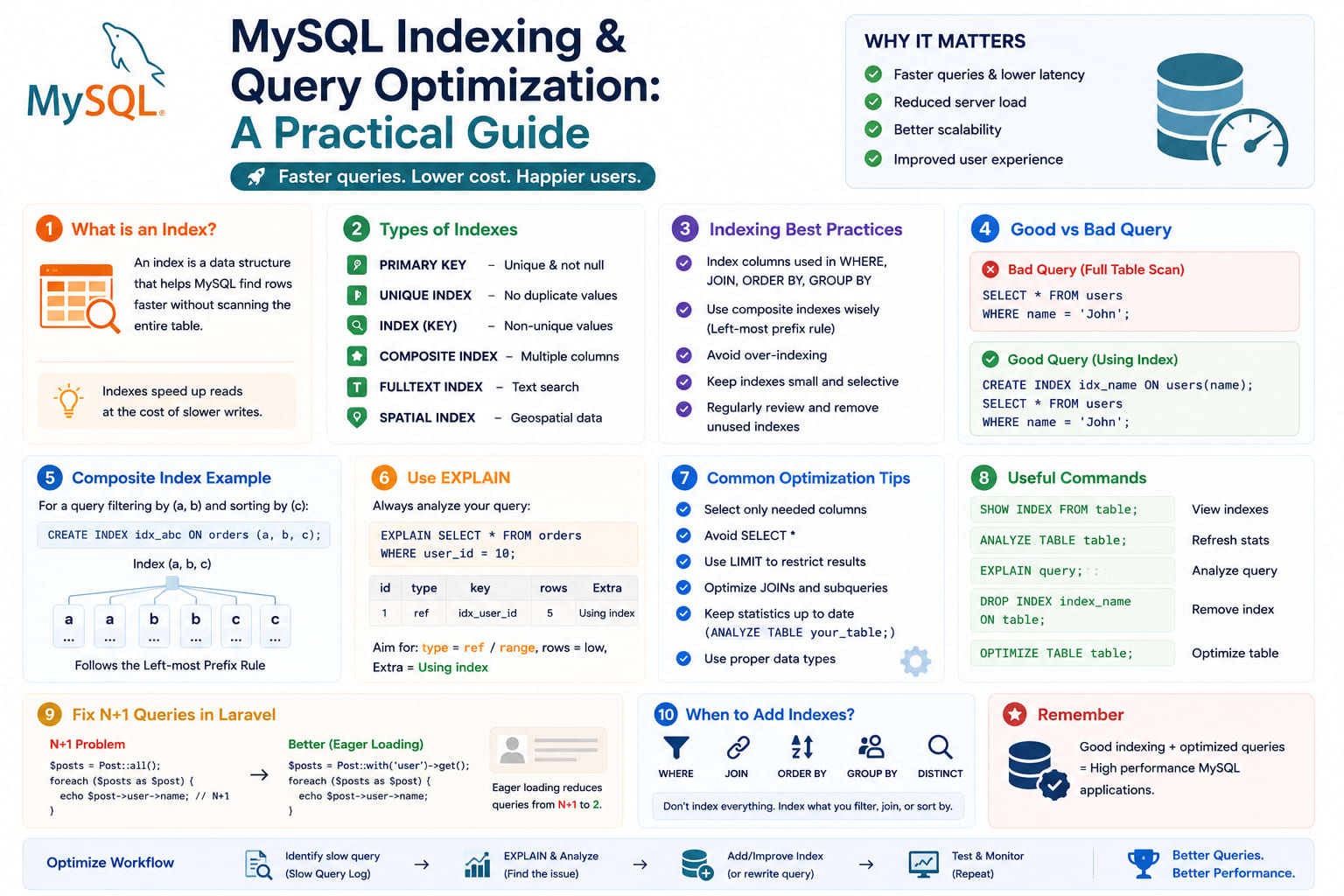
MySQL Indexing & Query Optimization: A Practical Guide
Most "slow database" problems aren't a hardware problem — they're a missing or wrong index problem. Before reaching for a bigger server or a caching layer, it's worth actually understanding what your queries are doing under the hood. Here's the practical version: how indexes work, how to read EXPLAIN, and the specific mistakes that quietly turn a fast query into a slow one as your table grows.
Table of Contents
- What an Index Actually Is
- Reading
EXPLAINOutput - Composite Indexes and Column Order
- Covering Indexes
- When an Index Won't Help (and Actually Hurts)
- The Query Patterns That Silently Kill Performance
- Fixing N+1 Queries in Laravel
- The Slow Query Log
- Index Cardinality and Selectivity
- A Practical Optimization Workflow
- Common Mistakes
- Wrapping Up
1. What an Index Actually Is
An index is a separate, sorted data structure (a B-tree, for MySQL's default InnoDB engine) that lets the database find rows without scanning the entire table. Without an index on a column you're filtering by, MySQL performs a full table scan — checking every single row to see if it matches. On a table with a few hundred rows, that's instant. On a table with ten million rows, that's the difference between a 5ms query and a 4-second one.
An index trades write performance and storage for read performance — every insert/update now also has to update the index. That tradeoff is almost always worth it for columns you filter, join, or sort on frequently, and almost never worth it for columns you rarely query against.
2. Reading EXPLAIN Output
EXPLAIN shows you exactly how MySQL plans to execute a query, before running it:
sql
EXPLAIN SELECT * FROM orders WHERE customer_id = 4521 AND status = 'pending';
The columns that matter most:
- type — the access method.
ALLmeans a full table scan (bad on a large table);reforrangemeans an index is being used (good);const/eq_refare the fastest, usually from a primary key or unique lookup. - possible_keys — indexes MySQL could use for this query.
- key — the index MySQL actually chose. If this is
NULLwhilepossible_keysshows something, MySQL decided not to use an available index — often a sign the query needs rewriting. - rows — MySQL's estimate of how many rows it has to examine. Lower is better; this is often the single most useful number on the whole output.
- Extra — watch for
Using filesort(an expensive sort MySQL couldn't avoid) andUsing temporary(a temporary table was needed) — both are red flags on large tables.
If type shows ALL and rows is a large number on a query that runs frequently, that's your first candidate for indexing.
3. Composite Indexes and Column Order
A composite (multi-column) index only helps queries that use its columns in order, from the left:
sql
CREATE INDEX idx_customer_status ON orders (customer_id, status);
This index speeds up:
sql
WHERE customer_id = 4521                          -- uses the index
WHERE customer_id = 4521 AND status = 'pending'    -- uses the index fully
But does not meaningfully help:
sql
WHERE status = 'pending' -- customer_id isn't specified, index can't be used from the left
The rule: put the column you filter on most selectively — or most consistently across your queries — first. If every query in your app filters by customer_id and only sometimes adds status, that column order is correct. If you regularly query by status alone too, you may need a second, separate index just for that.
4. Covering Indexes
A covering index contains every column a query needs, so MySQL can satisfy the entire query from the index itself without touching the actual table rows at all:
sql
CREATE INDEX idx_covering ON orders (customer_id, status, created_at);

SELECT status, created_at FROM orders WHERE customer_id = 4521;
Since status and created_at are both part of the index, MySQL never needs to look up the full row — EXPLAIN's Extra column will show Using index, which is meaningfully faster than a regular index lookup followed by a row fetch. This matters most on hot-path queries that run constantly.
5. When an Index Won't Help (and Actually Hurts)
- Low-cardinality columns — a
booleanorgender-style column with only 2-3 distinct values rarely benefits from its own index; MySQL often decides a full scan is faster anyway - Small tables — a table with a few hundred rows will often be scanned faster than an index lookup, simply due to overhead
- Columns rarely used in
WHERE/JOIN/ORDER BY— an index that's never used still costs write performance and storage on every insert/update, for zero benefit - Over-indexing — every additional index slows down every
INSERT/UPDATE/DELETEon that table; a table with fifteen indexes for convenience is a table with slow writes
6. The Query Patterns That Silently Kill Performance
sql
-- Wrapping an indexed column in a function defeats the index
WHERE YEAR(created_at) = 2026
-- Better: express the same range without wrapping the column
WHERE created_at >= '2026-01-01' AND created_at < '2027-01-01'

-- A leading wildcard can't use a standard B-tree index
WHERE email LIKE '%@gmail.com'
-- A trailing wildcard still can:
WHERE email LIKE 'tushar%'

-- SELECT * pulls every column even if you only need two,
-- and prevents a covering index from applying
SELECT * FROM orders WHERE customer_id = 4521;
-- Better:
SELECT id, status FROM orders WHERE customer_id = 4521;

-- Implicit type conversion silently disables index usage
WHERE phone_number = 9876543210    -- phone_number is VARCHAR; comparing to an int forces a conversion
WHERE phone_number = '9876543210'  -- matches the column's actual type, index usable
Each of these looks harmless in code review and runs fine on a development database with a few thousand rows — the cost only shows up once a table grows past the point where a full scan is actually slow.
7. Fixing N+1 Queries in Laravel
This is the most common real-world performance killer in Laravel apps specifically, and it's not really an indexing problem — it's a query-count problem:
php
// N+1: one query for orders, then ONE MORE query per order to get the customer
$orders = Order::all();
foreach ($orders as $order) {
    echo $order->customer->name; // triggers a separate query, per order
}
With 500 orders, that's 501 queries instead of 2. Fix it with eager loading:
php
$orders = Order::with('customer')->get(); // 2 queries total, regardless of order count
Laravel's query log or Laravel Debugbar will show you exactly this pattern during local development — a suspiciously high query count on a page that should need only a handful is almost always N+1. Laravel also ships Model::preventLazyLoading(), which you can enable in non-production environments to throw an exception the moment lazy loading happens, catching N+1 bugs before they ever reach production:
php
// AppServiceProvider::boot()
Model::preventLazyLoading(! app()->isProduction());
8. The Slow Query Log
Turn this on in any environment where you're chasing real performance issues rather than guessing:
sql
SET GLOBAL slow_query_log = 'ON';
SET GLOBAL long_query_time = 1; -- log anything slower than 1 second
SET GLOBAL slow_query_log_file = '/var/log/mysql/slow-query.log';
This log is ground truth — it tells you exactly which queries are actually slow in production, rather than which ones you assume are slow based on how the code looks. Pair it with pt-query-digest (from Percona Toolkit) or a hosted APM tool to summarize the log into a ranked list of your worst offenders by total time spent, not just by individual query duration.
9. Index Cardinality and Selectivity
Cardinality is the number of distinct values in a column relative to total rows. A user_id column on a table with millions of rows and millions of distinct users has high cardinality — a great index candidate. A status column with only 4 possible values has low cardinality — often a poor standalone index candidate, though it can still help as the second column in a composite index.
Check cardinality on an existing index:
sql
SHOW INDEX FROM orders;
Compare the Cardinality column against the table's total row count — if cardinality is a tiny fraction of total rows, that index isn't earning its keep on its own.
10. A Practical Optimization Workflow
- Turn on the slow query log in a staging or production-mirrored environment
- Identify the queries with the highest total time (frequency × duration), not just the single slowest one
- Run
EXPLAINon each and checktype,key, androws - If
keyisNULLandpossible_keysis empty, you likely need a new index — check column order for composite candidates - If an index exists but isn't being used, check for function-wrapping, implicit type conversion, or a leading wildcard defeating it
- Re-run
EXPLAINafter adding the index to confirmkeynow shows your new index androwsdropped significantly - Re-check the slow query log after deploying to confirm the fix actually reduced real-world query time
11. Common Mistakes
- Indexing every column "just in case" — quietly slows down every write on the table
- Ignoring composite index column order — an index that exists but is ordered wrong for your actual query patterns provides little to no benefit
- Trusting "it's fast on my machine" — a query is only proven fast against production-scale data and production-scale concurrency
- Fixing indexes but not fixing N+1 — no index makes 501 queries faster than 2; the query pattern itself is the actual bug
- Never re-checking
EXPLAINafter adding an index — assume nothing; confirm the optimizer actually picked up the new index as intended
12. Wrapping Up
Indexing isn't a one-time setup task — it's an ongoing conversation between your actual query patterns and your schema, one that shifts as your data grows and your features change. EXPLAIN is the tool that turns "the database feels slow" into "this specific query does a full scan on this specific table," which is the only version of the problem you can actually fix.